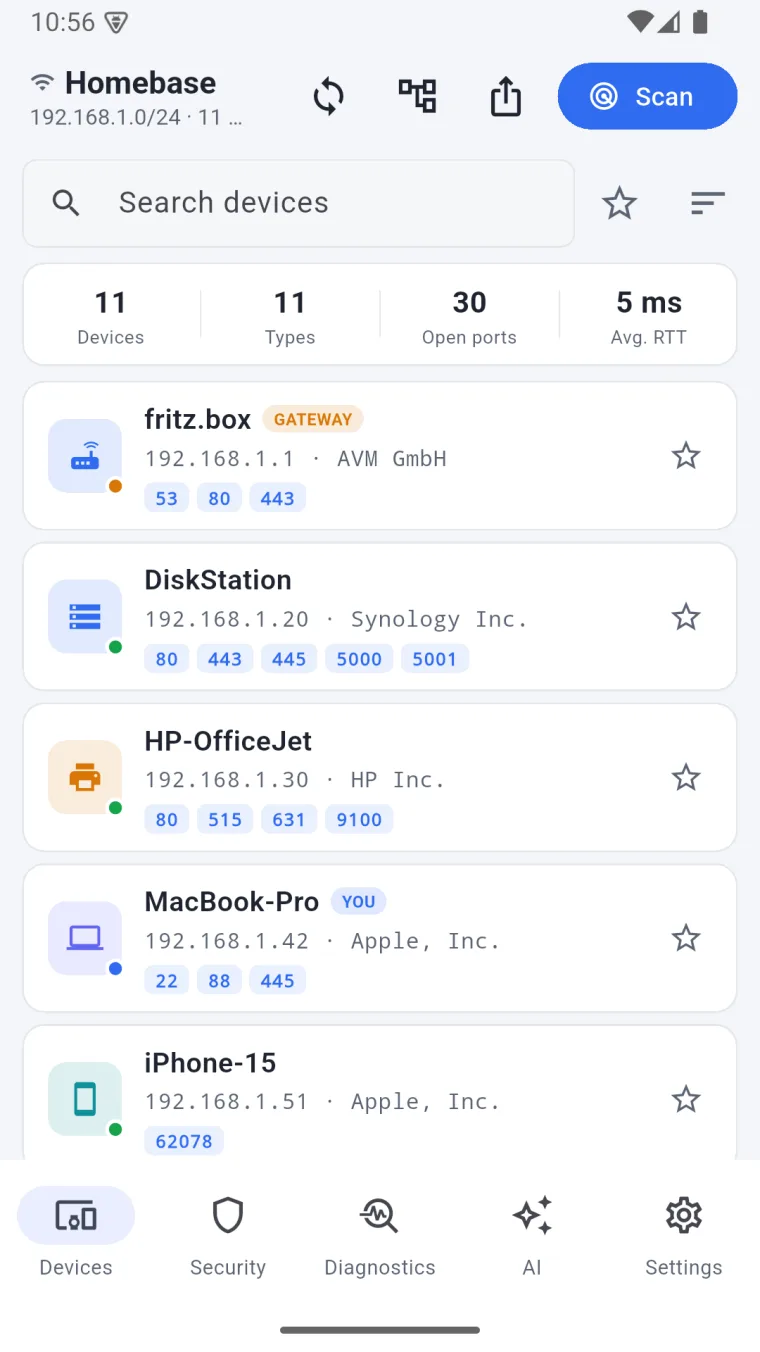
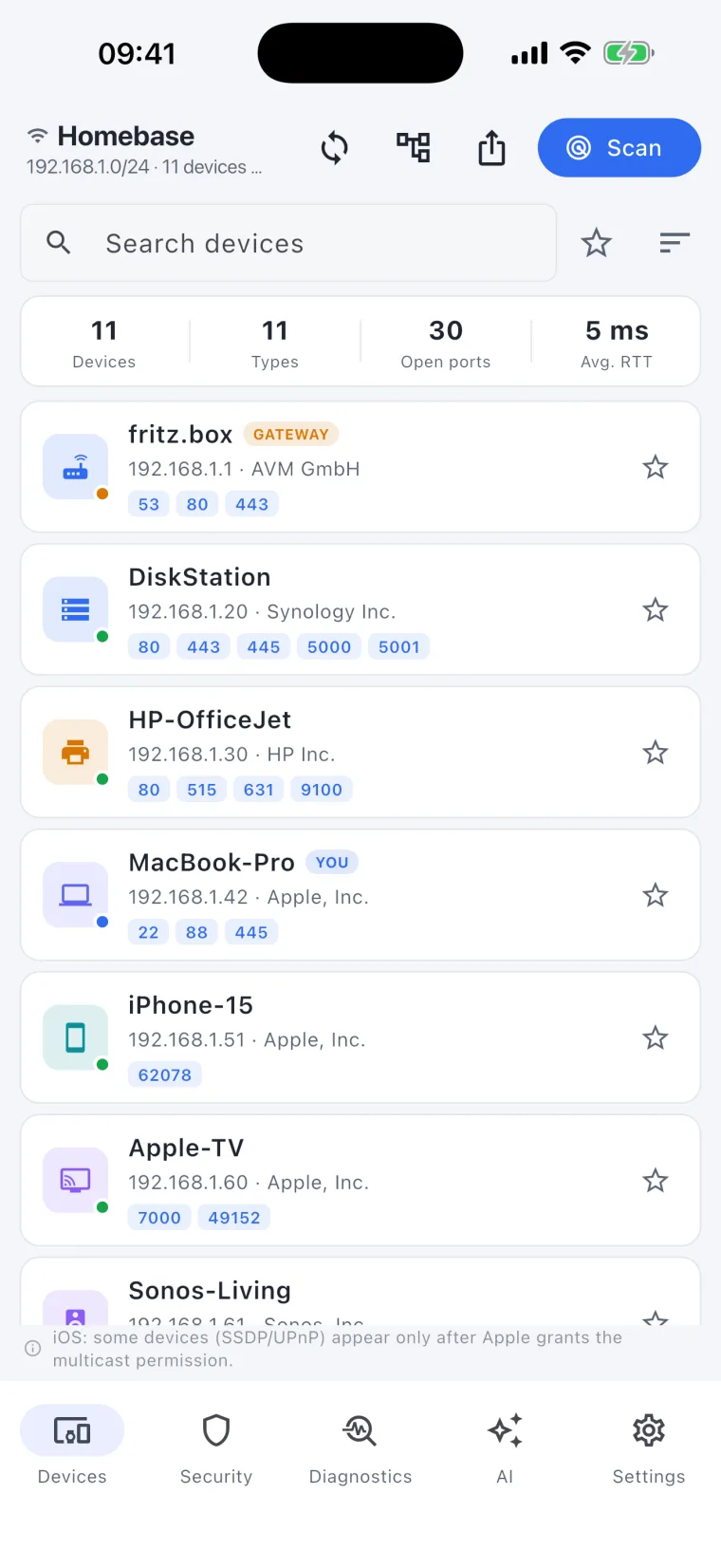
One-click network scan
Point it at your Wi-Fi or LAN and hit scan. A fast, read-only TCP-connect sweep finds every responding device in seconds and keeps the list fresh on every rescan — no setup, no agents, no router login.
The local-first network scanner
One click maps your whole network: every connected device, what it actually is, the ports it has open, and the risks it carries. Then DeviceShelf keeps watch — alerting you when something new appears. All local. No account. No telemetry.
📡 One-click LAN scan 🖥 Mac · Windows · Linux · 📱 iOS & Android soon · 24/7 server 🛡 Local-first · read-only · no telemetry
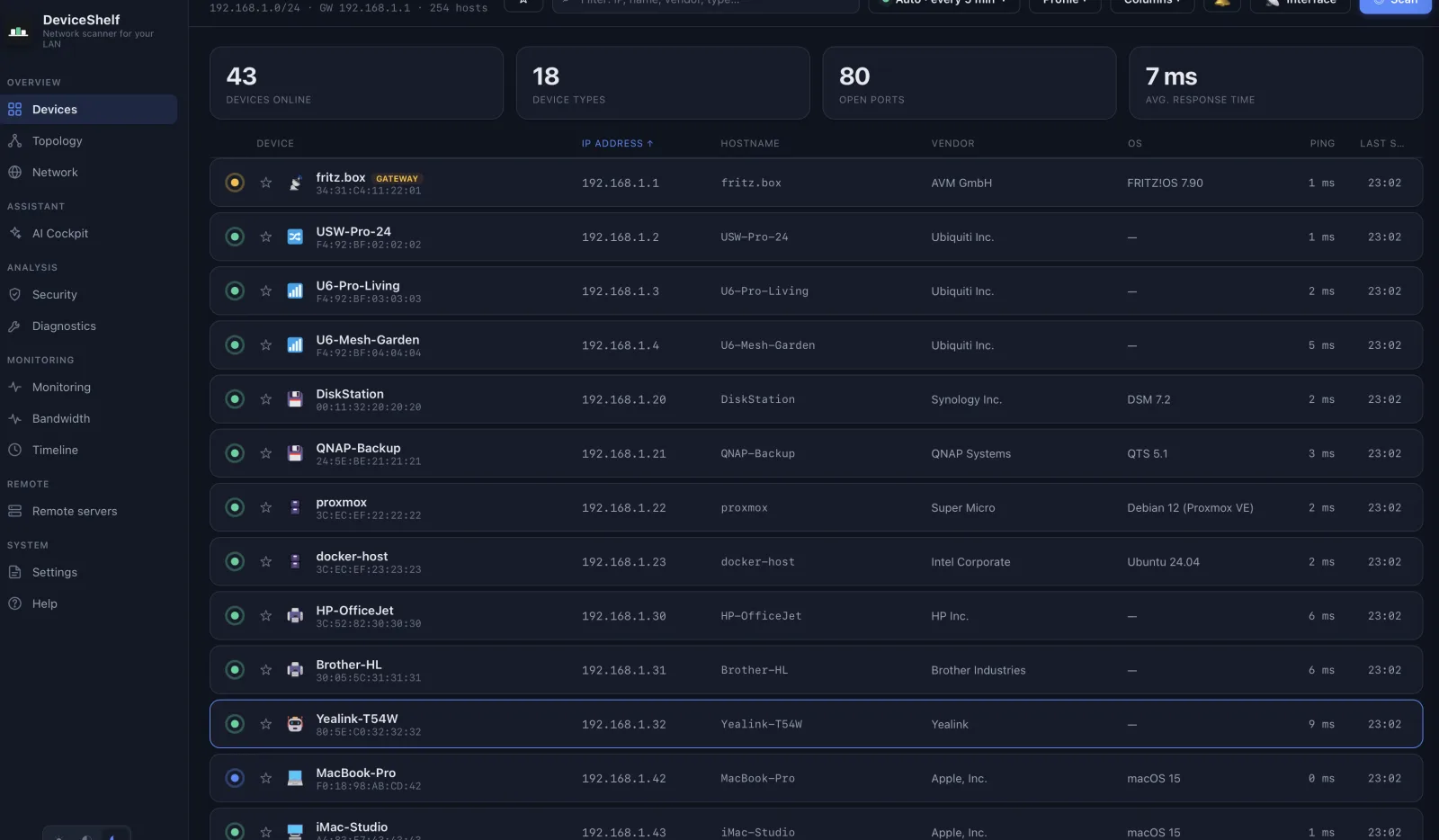
Inside the app
These are the views you actually use. Every value is populated by a live scan of your own network — no spreadsheets, no manual entry.
One click sweeps the whole subnet. Every responding device with its IP, vendor and detected type — sorted, searchable and exportable.
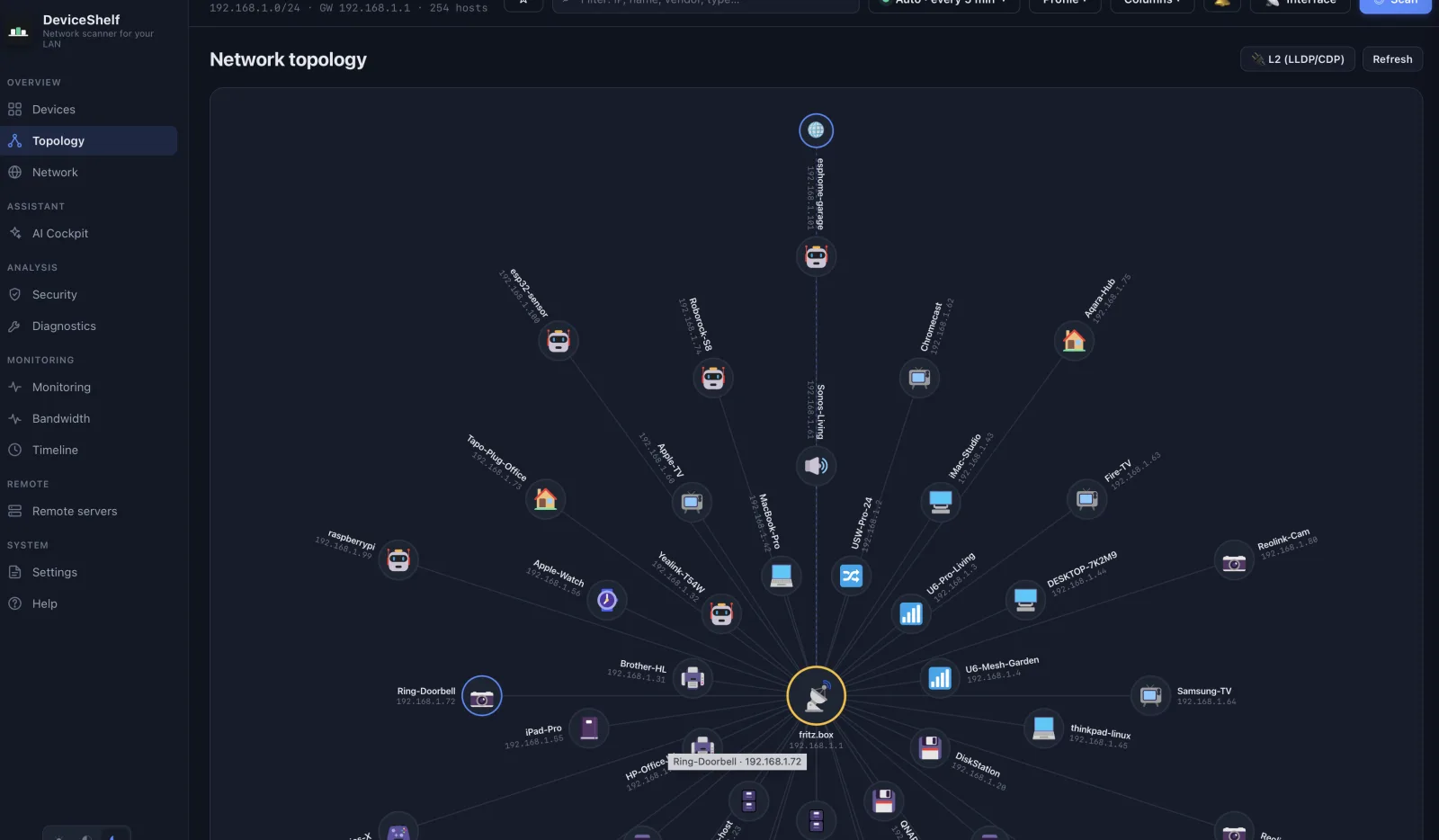
Your whole LAN at a glance: every device arranged around the gateway as a clean, interactive map.
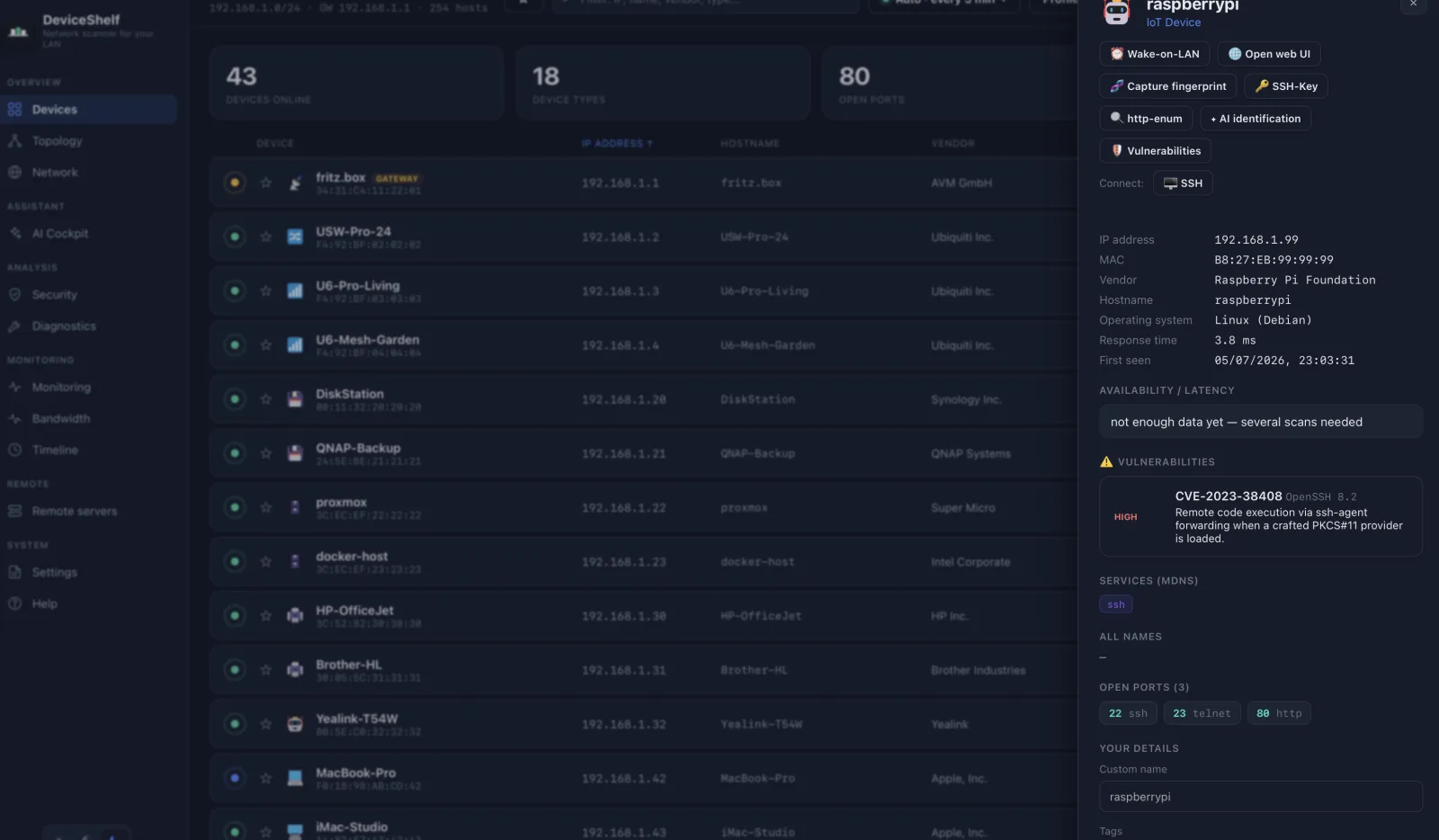
A deep dive on any device: vendor, all hostnames, OS guess, response time, CVE hints and one-click connect (SSH, VNC, SMB…).
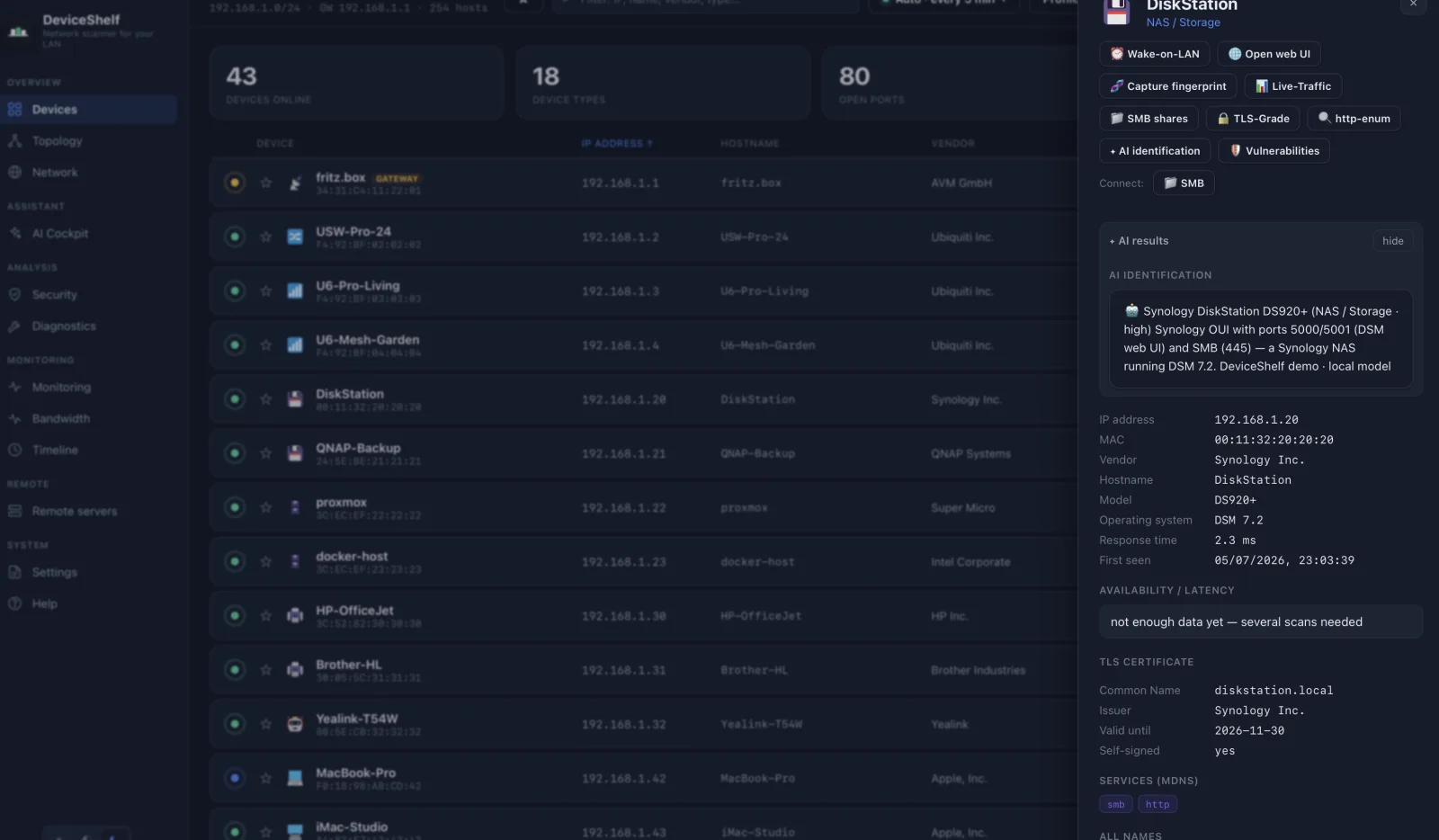
Stuck on an unknown device? Your own AI key identifies it from the network signals — hardware, role and reasoning, in your language.
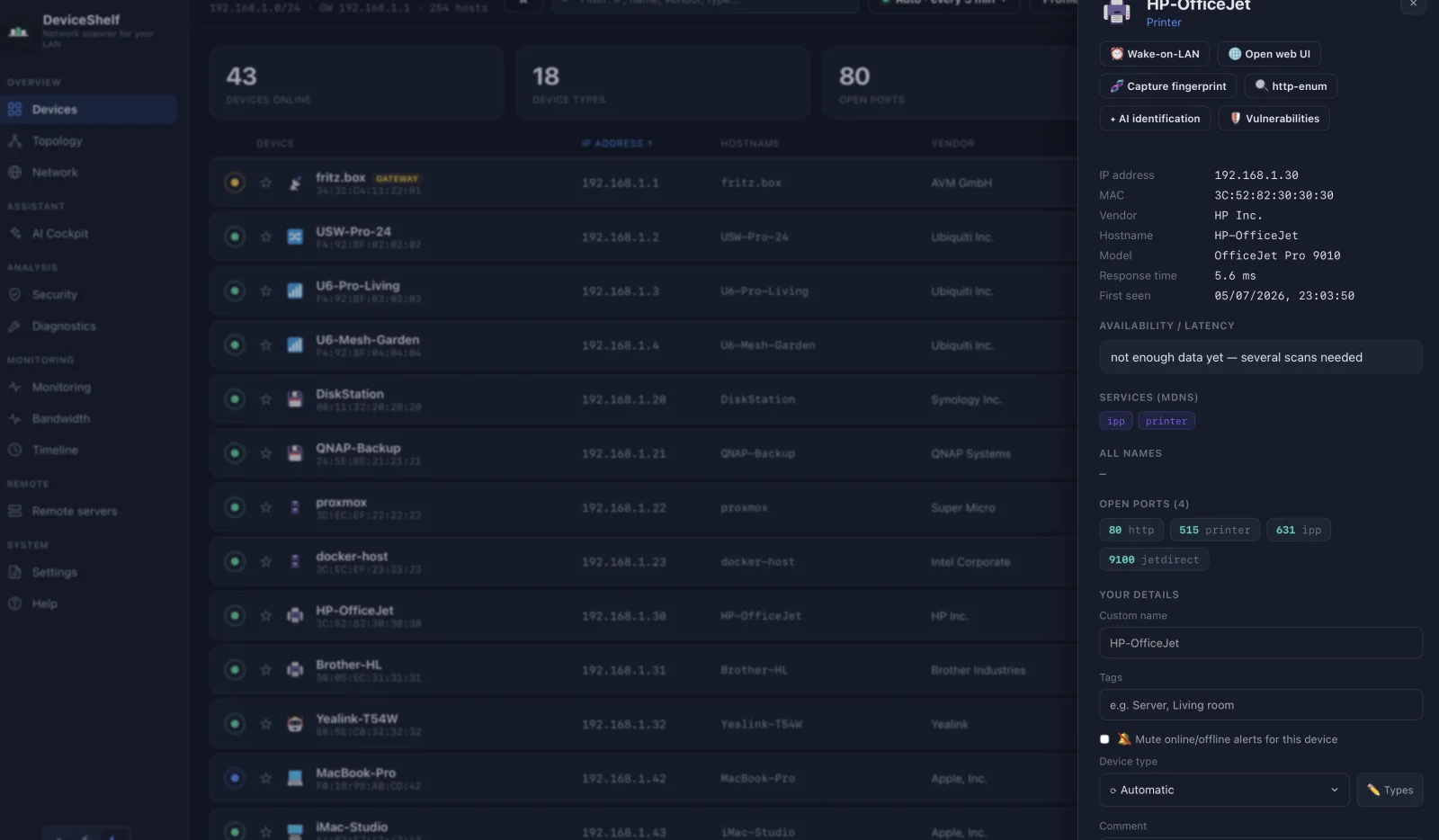
Every open port with its detected service and banner — SSH, MQTT, Home Assistant and more — plus your own name, tags and notes per device.
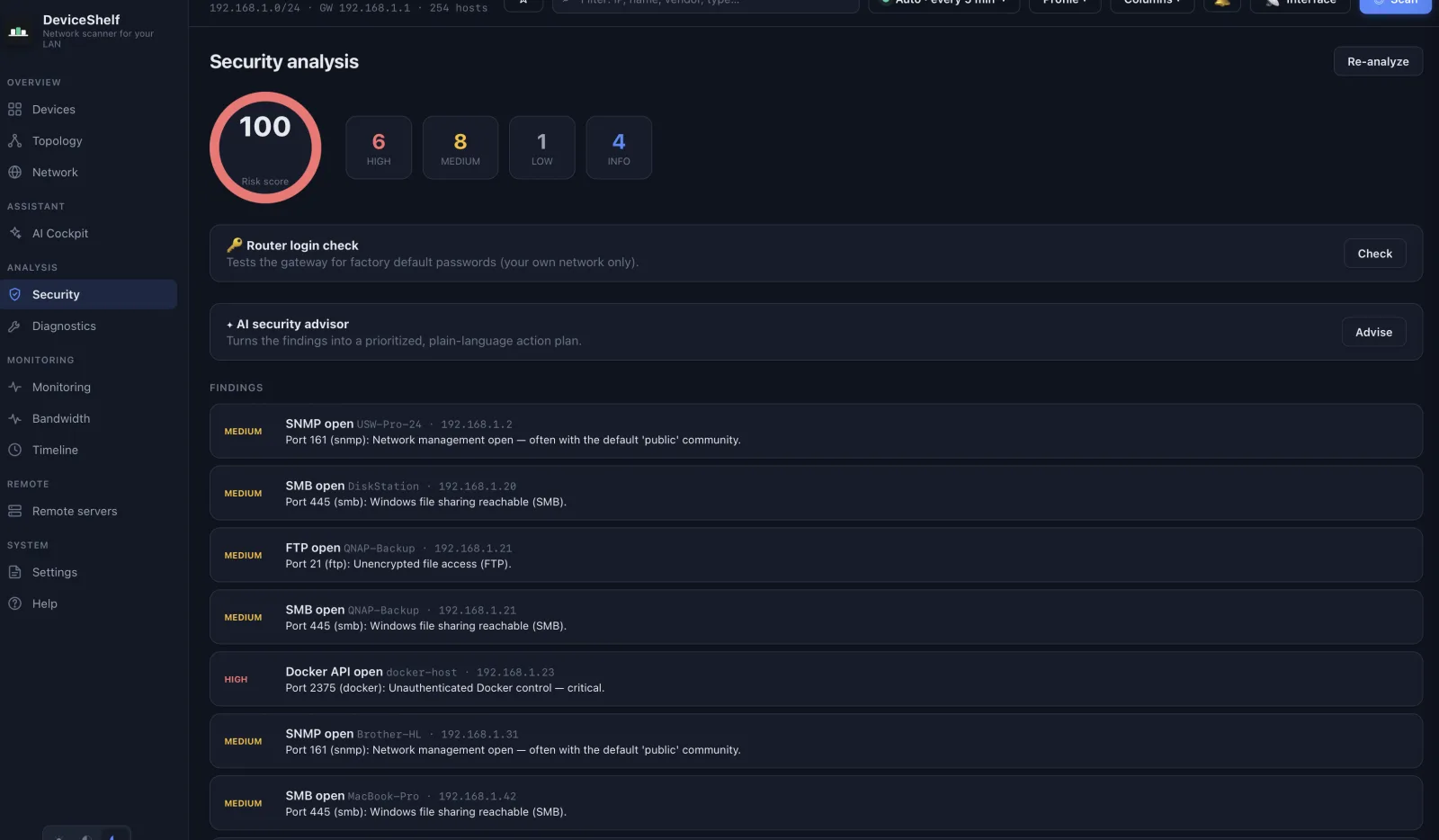
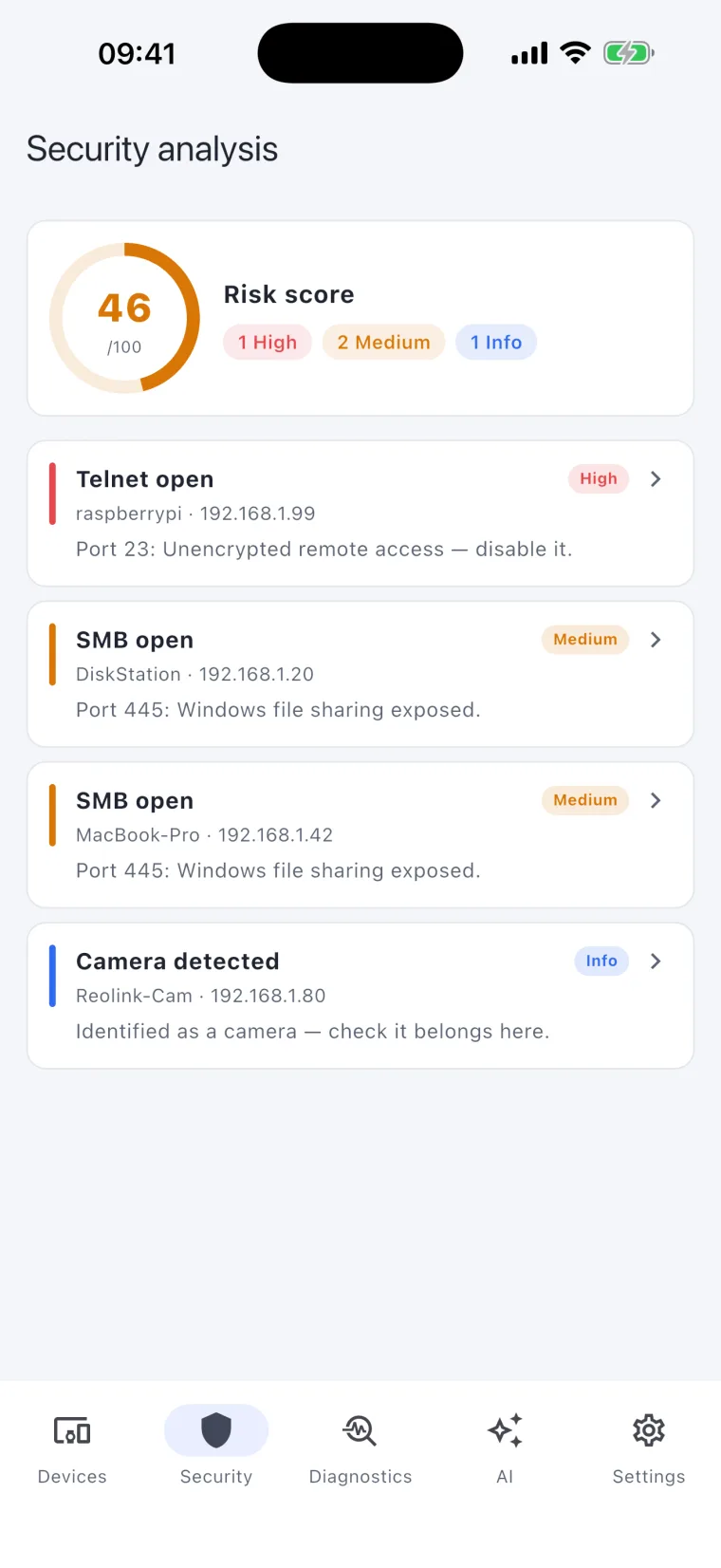
A prioritized security report: risk score, exposed risky services, default-credential checks and an AI security advisor with concrete fixes.
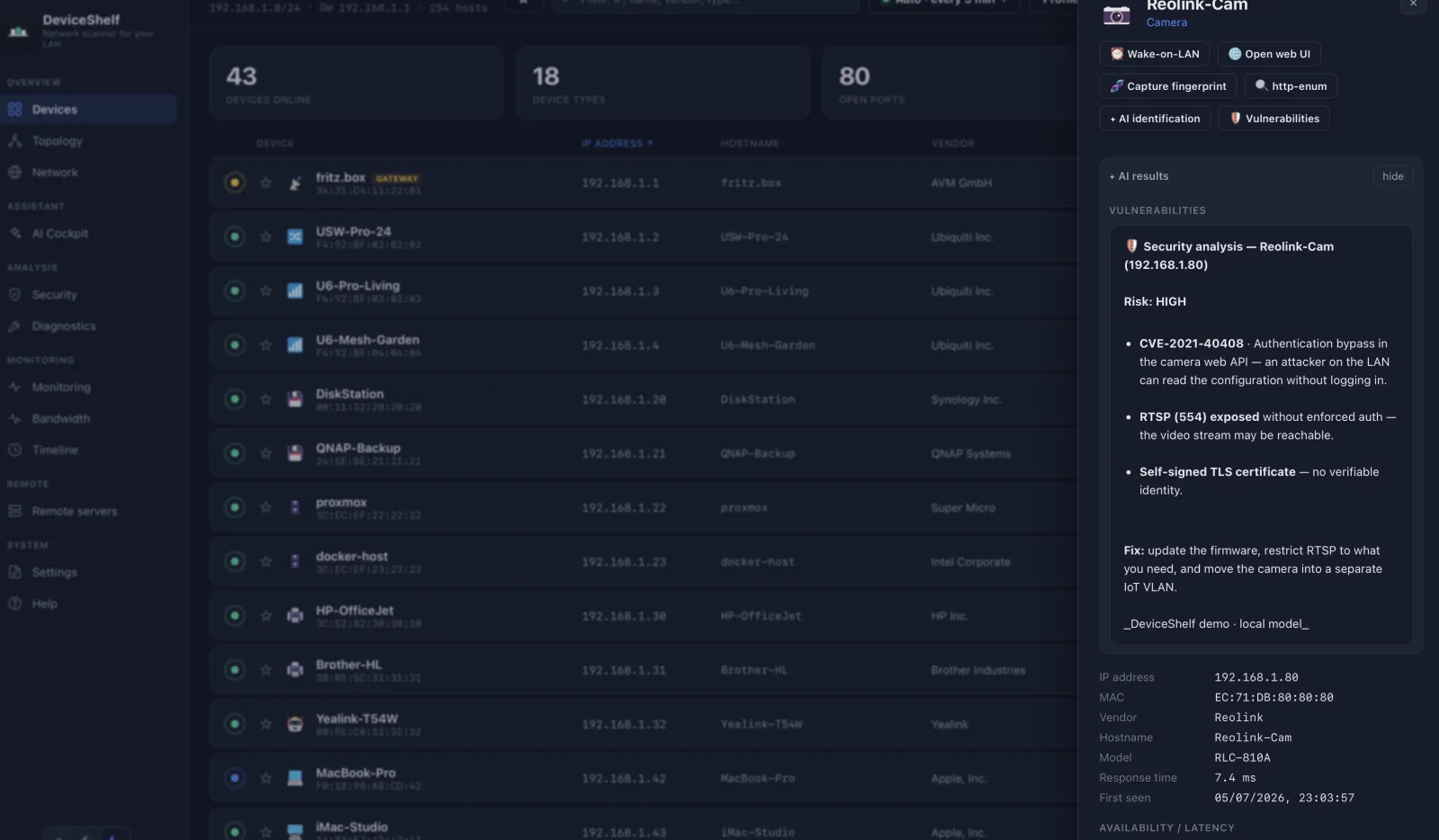
Per-device CVE analysis from the detected service versions — severity, description and a concrete remediation for each finding.
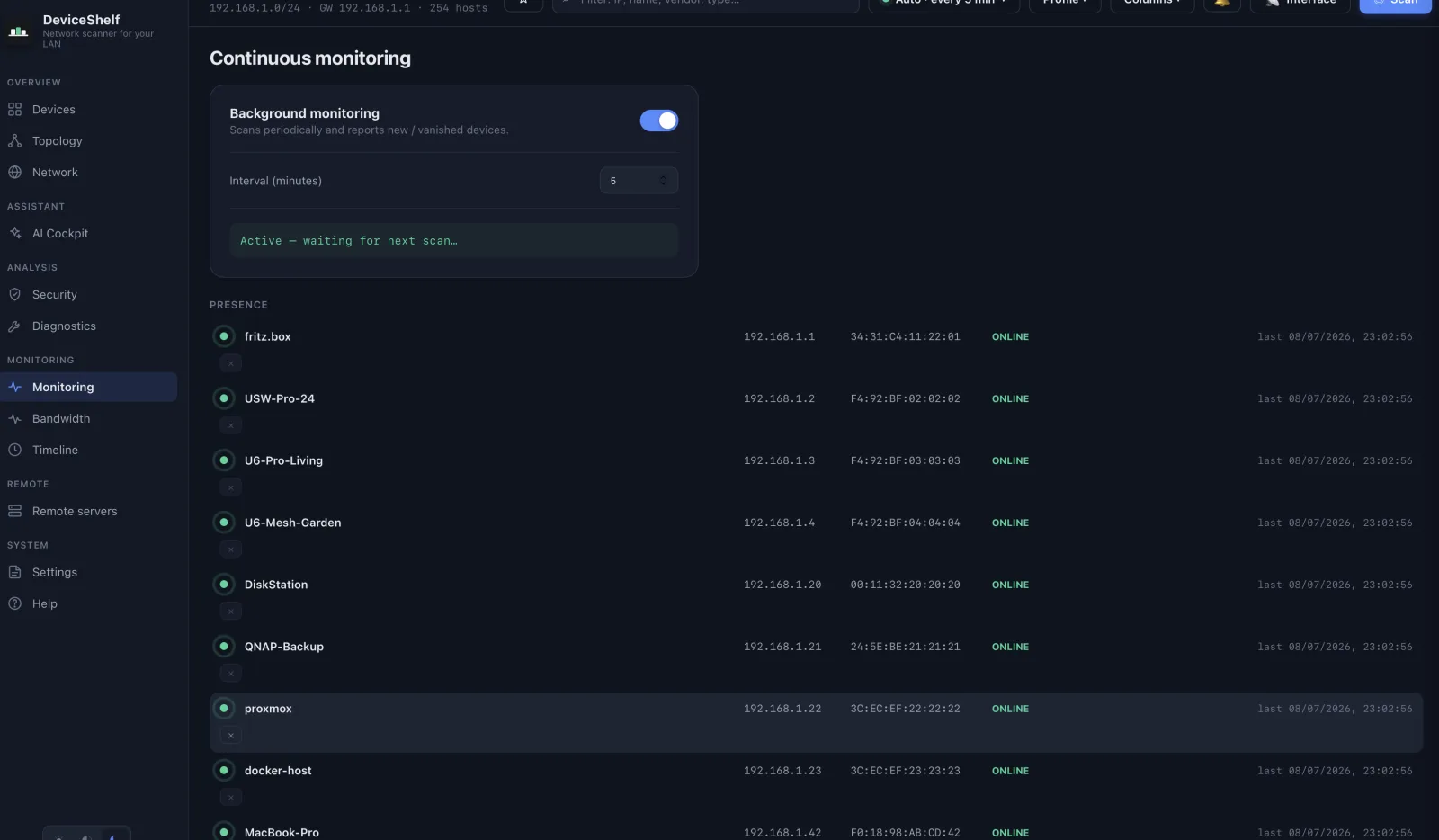
Background monitoring tracks who comes and goes and alerts you the moment an unknown device joins your network.
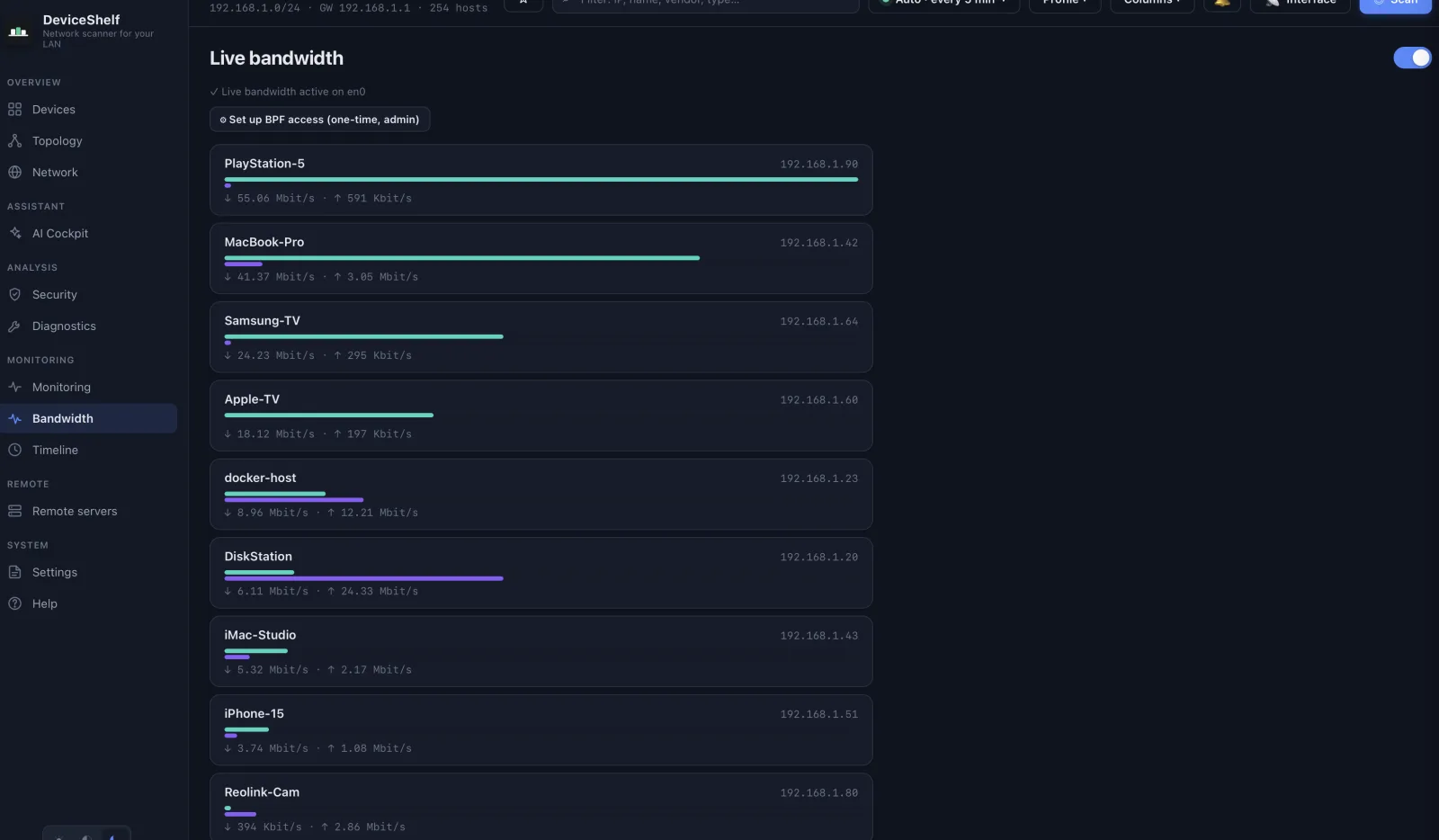
Live per-device throughput, up and down — so you instantly see what's hogging the line.
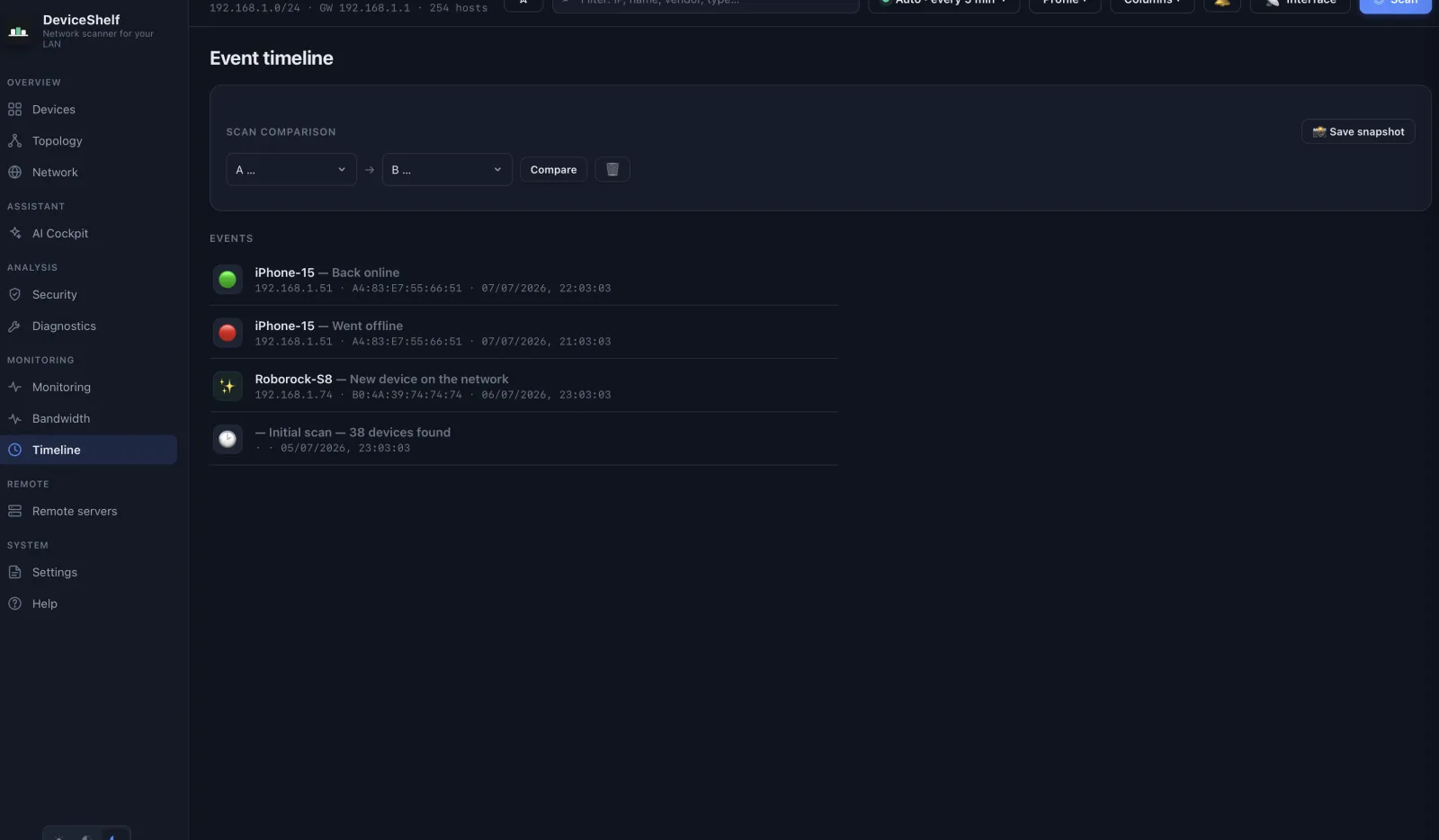
A full timeline of everything that changed — devices on and offline, ports opening and closing — with snapshot comparison.
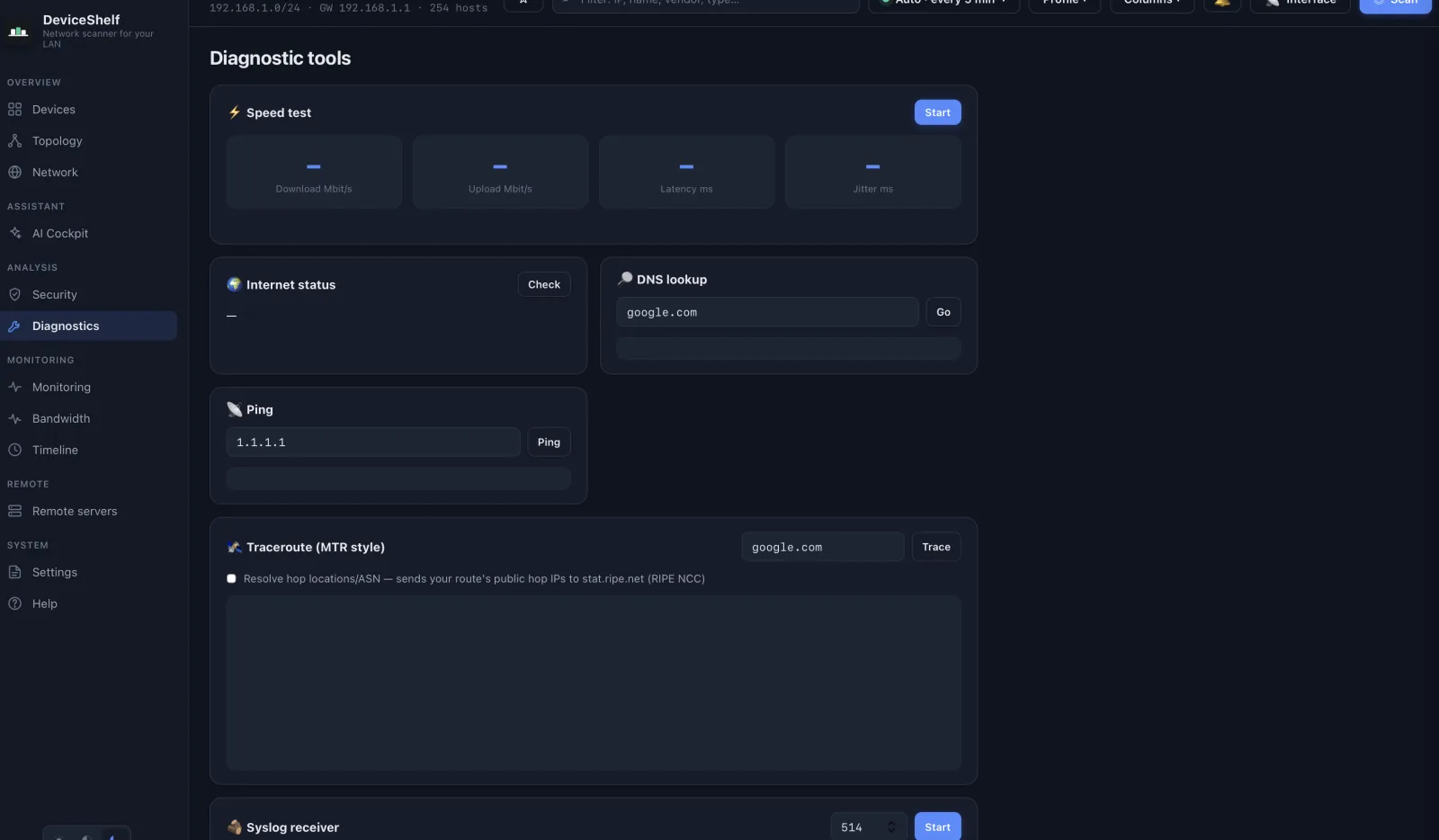
Built-in speed test, DNS lookup, ping and MTR-style traceroute — the everyday network tools, right where you need them.
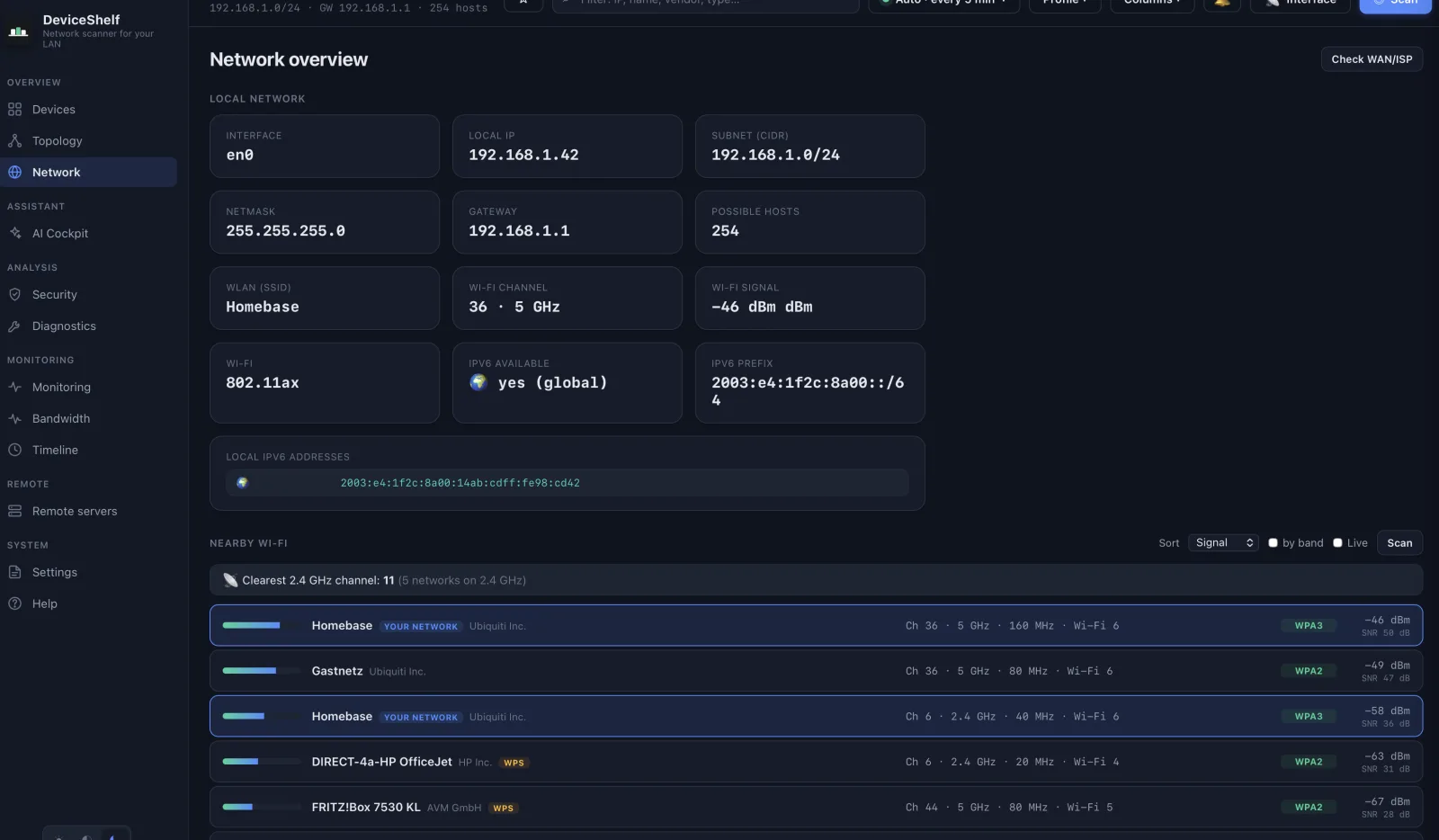
Your network at a glance — subnets, gateway, DNS and WAN details, with live status for every interface.
For anyone who wants to know, fast: what's on the network, what each device is, and what's a risk.
Why DeviceShelf exists
One evening my router listed a device I didn't recognise — just a MAC address and an IP. Mine? A neighbour's? Something worse? The router's own page told me nothing useful, and the scanner apps I tried were either ad-riddled, cloud-bound, or stopped at a bare list of IPs.
I wanted the obvious thing: point it at my network and tell me what each device actually is — vendor, name, type, open ports — and flag anything risky. Locally. Without an account, without uploading my home network to someone's server.
So I built it. Scan, identify, watch, and warn — on every device I own, from my Mac to my phone. That became DeviceShelf.
— Christof, builder of DeviceShelf
Features
Three things stand out: a one-click scan that maps your whole network, deep identification that tells you what each device really is, and a security report that flags what's risky. Everything else builds on those three.
Point it at your Wi-Fi or LAN and hit scan. A fast, read-only TCP-connect sweep finds every responding device in seconds and keeps the list fresh on every rescan — no setup, no agents, no router login.
Multi-homed? Select several adapters — Wi-Fi, Ethernet, VLANs — and DeviceShelf sweeps them all into one merged device list. A “show all adapters” toggle surfaces the interfaces other scanners hide: VPN, VirtualBox, Hyper-V and Docker bridges.
More than an IP list. DeviceShelf resolves the vendor (MAC OUI), hostname (DNS, mDNS/Bonjour, NetBIOS), OS (TTL, DHCP fingerprint) and device type — router, computer, phone, printer, camera, NAS, IoT — automatically.
A prioritized risk report for the whole network: exposed dangerous services (Telnet, RDP, ADB, Docker API, Redis…), default-credential checks, weak TLS, known-CVE hints and camera/privacy flags — each with a fix and a 0–100 risk score.
Per device, enumerate open TCP/UDP ports with service detection and banner grabbing. Quick, Standard, Deep (1–1024) and Full (1–65535) profiles, plus slow/normal/aggressive timing — you decide thorough vs. fast.
Background polling tracks which devices come and go and notifies you the moment an unknown device joins. Availability history with uptime and latency per device — perfect for spotting intruders or flaky gear.
See live throughput per device so you can tell what's actually using the line right now. Find the streaming box, the backup that's saturating the uplink, or the chatty IoT gadget at a glance.
Go further on any device: TLS grading and certificate inspection, SSH key fingerprinting, SMB share enumeration, UPnP model/serial, SNMP system info and nmap-style HTTP enumeration of common admin paths.
See the real layout, not just a list. DeviceShelf reads LLDP/CDP and the switch bridge table over SNMP to map which device hangs off which switch port, and draws the links between your routers and switches.
Point your routers, switches and access points at DeviceShelf and read their logs in-app — a local syslog receiver (UDP/TCP, RFC 3164/5424). No cloud collector; the logs never leave your LAN.
Ping with aggregate stats, streaming traceroute, DNS lookups, a connectivity health check and a built-in speed test (latency, download, upload) — the tools you'd otherwise juggle across five apps, in one place.
Power on compatible machines straight from the device list with a single tap. Great for waking a NAS, a desktop or a media server without getting up.
Export the device list to JSON or CSV, or generate a styled, shareable HTML report. Add custom names, notes and type overrides per device — they persist across scans. An optional local API and webhooks let you wire DeviceShelf into your own tooling.
The 24/7 server edition speaks the Model Context Protocol: connect Claude, Cursor or any MCP client and ask about your network in plain language — “what’s new since yesterday?”, “which certs expire soon?”. 22 tools, strictly local, read-only by default.
Everything runs and stays on your device. No account, no sign-up, no telemetry, no analytics. Your license is verified offline with an ed25519 signature — so the app doesn't phone home to check it.
The same scanning engine on macOS, Windows and Linux today — with iOS and Android apps launching soon. Scan from your laptop at the desk now, and from your phone on the couch once mobile ships — one license covers every device you own.
AI, optional
Stuck on a device that's just a MAC address and an open port? Let AI name it from the network signals. Get a plain-language digest of your whole network, ask what's risky and why, and turn the security findings into step-by-step fixes. Everything is grounded in your real scan data — no guessing from a generic checklist.
Bring your own key — AI is entirely optional. Your prompts never touch our servers; they go directly from your device to the provider you picked. Prefer fully offline? Run a local model with Ollama.
No vendor lock-in. Switch providers in Settings → AI any time.
Private by default
A scan of your network is sensitive — it's a map of your home or office. DeviceShelf is built so that map never leaves your device unless you explicitly choose to send part of it.
Every scan result is stored locally on your device. There is no DeviceShelf cloud, no central database, nowhere for your network map to leak from.
Install and scan. No registration, no email verification, no profile. We don't know who you are, and we like it that way.
No analytics, no phone-home, no anonymous metrics. The app does not report what you scan, what you find, or that you opened it.
Your license is verified locally with an ed25519 signature — no license server, no online activation, no check-in. It keeps working even fully offline.
Data leaves only when you turn a feature on or run an online tool: AI (to your provider), Fingerbank lookup, WAN-IP info, speed test and hop geolocation (Cloudflare & RIPE NCC), or webhooks you configure. Everything is off by default and clearly labelled.
Default scans are non-intrusive TCP-connect probes — they observe, they don't attack. You control depth and timing, from a quick sweep to a full deep scan.
It knows what it's looking at
DeviceShelf combines many signals — MAC vendor (OUI), DNS, mDNS/Bonjour, NetBIOS, SNMP, UPnP, TTL, DHCP fingerprint and open-port profiles — to label each device with a type and a best guess at what it is.
Desktop and pocket
Android beta — out now
Not a watered-down companion — the iOS and Android apps run the same scanning engine as the desktop. Walk around the house or office and scan from where you stand. One license covers every device you own.
iOS & Android
Native iOS and Android apps that scan, identify and monitor on their own — no desktop required. The perfect way to check a friend's Wi-Fi, an office network or a hotel LAN while you're standing right next to it.
Available now as a direct download while the Google Play listing clears review. It's the same signed app — a 7-day free trial, then activate your license key.
Desktop, pocket — and your server
A headless server edition runs the same engine continuously — no GUI, in Docker on a Linux box or VM. It keeps watching the networks you care about and alerts you the moment something changes. Covered by your existing license.
docker run -d --name deviceshelf-server --network host \
  --cap-add NET_RAW --cap-add NET_BIND_SERVICE \
  -v deviceshelf:/data \
  ghcr.io/wealthwallet/deviceshelf-server:1.5.15
After start, grab the auto-generated token: journalctl -u deviceshelf-server | grep -iA1 auto-generated · then open http://<host>:8088. New to the server edition? See the server install guide.
🖥 Now in beta The 24/7 server edition is now in beta — headless, Docker-based continuous monitoring with alerts, covered by your existing license. Hit a bug or want a feature? Tell us — your feedback shapes where it goes.
Talk to us
We read every message and usually reply within a working day. For technical bugs the in-app Help → Send feedback dialog ships extra context automatically. Otherwise, this form:
Frequently asked
Locally, on the device that ran the scan. There is no DeviceShelf cloud and no account — your network map never gets uploaded anywhere. You can export it yourself to JSON, CSV or an HTML report whenever you like.
No scan data leaves your device by default. DeviceShelf only sends scan traffic on your local network — nothing goes to the internet unless you explicitly use an online feature: AI (to the provider whose key you supplied), Fingerbank device lookups (fingerbank.org), WAN-IP info and the built-in speed test (Cloudflare), IP geolocation for WAN info and traceroute hops (stat.ripe.net, RIPE NCC), or webhooks you configure yourself. No analytics, no phone-home, no telemetry.
Scanning a network you own or administer is completely normal, and DeviceShelf's default scans are lightweight, read-only TCP-connect probes — they observe rather than attack. Only scan networks you have permission to scan.
DeviceShelf is built for users who prefer a local-first desktop and mobile scanner without an account, telemetry or subscription. Fing offers its own app ecosystem and subscription plans; DeviceShelf focuses on local network visibility, offline licensing and one-time pricing.
Yes — and AI is entirely optional; the scanner works fully without it. Drop in your Anthropic / OpenAI / Azure OpenAI / OpenRouter / Mistral / Groq / Gemini key, or run Ollama locally for fully offline AI. Your prompts always go directly from your device to your chosen provider.
Yes — the 24/7 server edition (from 1.5.3) includes a local MCP server: any MCP-capable client (Claude Desktop & Code, Cursor, VS Code, Windsurf, Cline, Gemini CLI) can query your live inventory, alarms and security findings — 22 tools in total. Strictly local, off by default, read-only unless you explicitly allow actions, and included in every paid license. See the connection guide.
One license = one user, unlimited personal devices. Use the same key on every Mac, PC, Linux box, iPhone and Android device you own. The license is per user, not per machine.
Yes — a 7-day free trial with full features, no credit card required. After that it's a one-time €39 purchase. No subscription, ever.
Yes. Your purchase is yours to keep — no subscription, nothing to renew. v1 keeps improving: every 1.x update brings new features and fixes, free of charge, and we'll keep delivering them for as long as the operating systems allow. No software runs on every future OS forever, but we plan to support v1 for a long time. There's no upgrade treadmill: a future v2 would be a major new generation, years away, and an entirely optional paid upgrade — and you can keep using your v1 either way.
14 days, money-back, no questions asked. Email [email protected] from the address you bought with.
Desktop (available now): macOS, Windows and Linux. Mobile (coming soon): iOS and Android. The same scanning engine runs everywhere, and your single license covers all of them — desktop today, mobile once released.
Yes — the headless server edition is now in beta (shipping in 1.4.0). It runs continuous, always-on monitoring without a GUI (in Docker, or via the .deb, on a Linux box or VM) for networks you want watched around the clock. It's covered by your existing license — same key, no extra cost. As a beta it may have rough edges, so if you hit a bug or have a feature request, please get in touch.
Yes — for teams, MSPs and privacy-conscious businesses we take on sponsored feature development: custom reports, deployment options, integrations and offline-licensing scenarios. It stays local-first — no telemetry, no hidden cloud. See the Business & sponsored features page, or email [email protected].
Weighing your options? Compare DeviceShelf with Fing, LanScan Pro, Advanced IP Scanner & Angry IP Scanner →
Local-first by design
Every scan, every device, every note lives on your device. There's no DeviceShelf server holding a copy — so there's nothing to breach, subpoena or sell. You own the data and you can wipe or export it any time.
Download, install, scan. No email, no sign-up, no login. We genuinely don't know who our users are or what's on their networks — and that's the point.
No analytics, no phone-home, no "anonymous metrics". The app doesn't report what you scan, what it finds, or even that you launched it.
AI is optional. When you use it, your provider key stays on your device and prompts go straight to the provider you chose. We never see them, and we host no model of our own.
Pricing
No subscription. No account. No telemetry. One local-first licence. Most subscription-based network scanners cost monthly — DeviceShelf is a one-time purchase. Your v1 licence includes every 1.x update; a future v2 will be an optional paid upgrade. Desktop now (macOS, Windows, Linux); iOS & Android soon. AI runs on your own provider key — no extra cost, no lock-in.
Good to know: DeviceShelf scans the local network the device is connected to. Run it on the Wi-Fi/LAN you want to inspect. Only scan networks you own or are allowed to scan.
€39 intro price, incl. VAT — €59 after the mobile apps & server edition fully launch. v1: all 1.x updates included.
Early users get the full v1 package for €39 — desktop, the upcoming mobile apps, and the 24/7 server edition (now in beta). Regular price €59 after launch. AI-ready with your own provider key.
For homelabs, small offices, consultants and privacy-conscious power users.
Company or MSP missing a specific feature? Business & sponsored features
Honest expectations
Please read this before you buy. It saves both of us a refund.
Everything core works on all three desktop platforms. A few capture and Wi-Fi features depend on the OS:
| Feature | macOS | Windows | Linux |
|---|---|---|---|
| Network scan & device discovery | ✓ | ✓ | ✓ |
| Open ports & security report | ✓ | ✓ | ✓ |
| AI device ID & chat | ✓ | ✓ | ✓ |
| Deep probes (TLS, SSH, SMB, HTTP) | ✓ | ✓ | ✓ |
| Traceroute, ping, DNS, speed test, Wake-on-LAN | ✓ | ✓ | ✓ |
| Snapshots, favorites, tags, export | ✓ | ✓ | ✓ |
| Live bandwidth per device 1 | ✓ | ✓ | ✓ |
| Passive DHCP fingerprinting 1 | ✓ | — | ✓ |
| Nearby Wi-Fi scan (SSID, signal) 2 | ✓ | — | — |
Beyond the desktop, a headless 24/7 server edition (beta) runs the same engine on Linux/Windows/Docker — continuous monitoring, no GUI. Server guide →
7-day free trial — no account, no credit card. macOS is notarized; Windows & Linux are unsigned (you can verify everything on the privacy page).
| x86-64 · amd64 | ARM64 | |
|---|---|---|
| .deb Debian/Ubuntu | Download | Download |
| .rpm Fedora/openSUSE | Download | Download |
| AppImage any distro | Download | Download |
Debian/Ubuntu & ARM: .deb · Fedora/openSUSE: .rpm · any distro: AppImage. Pick arm64 for Raspberry Pi / ARM.
curl -fsSL https://downloads.deviceshelf.app/apt/key.gpg | sudo gpg --yes --dearmor -o /usr/share/keyrings/deviceshelf.gpg
echo "deb [signed-by=/usr/share/keyrings/deviceshelf.gpg] https://downloads.deviceshelf.app/apt stable main" | sudo tee /etc/apt/sources.list.d/deviceshelf.list
sudo apt update && sudo apt install deviceshelfNo GUI — installs as a background service on Windows Server / Windows 11, Docker, or Debian/Ubuntu/Fedora. Same engine, continuous monitoring, dashboard & API.
Server Edition — downloads & setup →📱 iOS & Android apps are coming soon.

From the same workshop
ServerShelf is our local-first server cockpit: inventory your servers, run SSH, track SSL and updates, and triage logs with AI. Same principles — one-time purchase, no cloud account, no telemetry.