What you want to know is spread across four tools.
The router page for the lease, a terminal for arp, a lookup site for the vendor, a scanner for the ports. Four places, one device.
Network scanner for macOS, Windows and Linux
IP address, hostname, vendor, device type, open ports, availability and risks. Detected automatically and laid out in one place.
No credit card, no account, everything stays on your machine. One payment of €59, no subscription.
macOS · Windows · Linux · iOS · Android · Server 24/7 · MCP for AI agents
The router page for the lease, a terminal for arp, a lookup site for the vendor, a scanner for the ports. Four places, one device.
android-8f2c at 192.168.1.31 tells you nothing about whether it is the robot vacuum, the doorbell or something that is not yours.
None of those tools tells you whether a service was already open last week, or when the device was last reachable.
DeviceShelf brings that information together in one view, locally on your machine. Scan once, and it keeps the record from there.
Demo
A live dashboard you can click through, and a one-minute tour of the whole app.
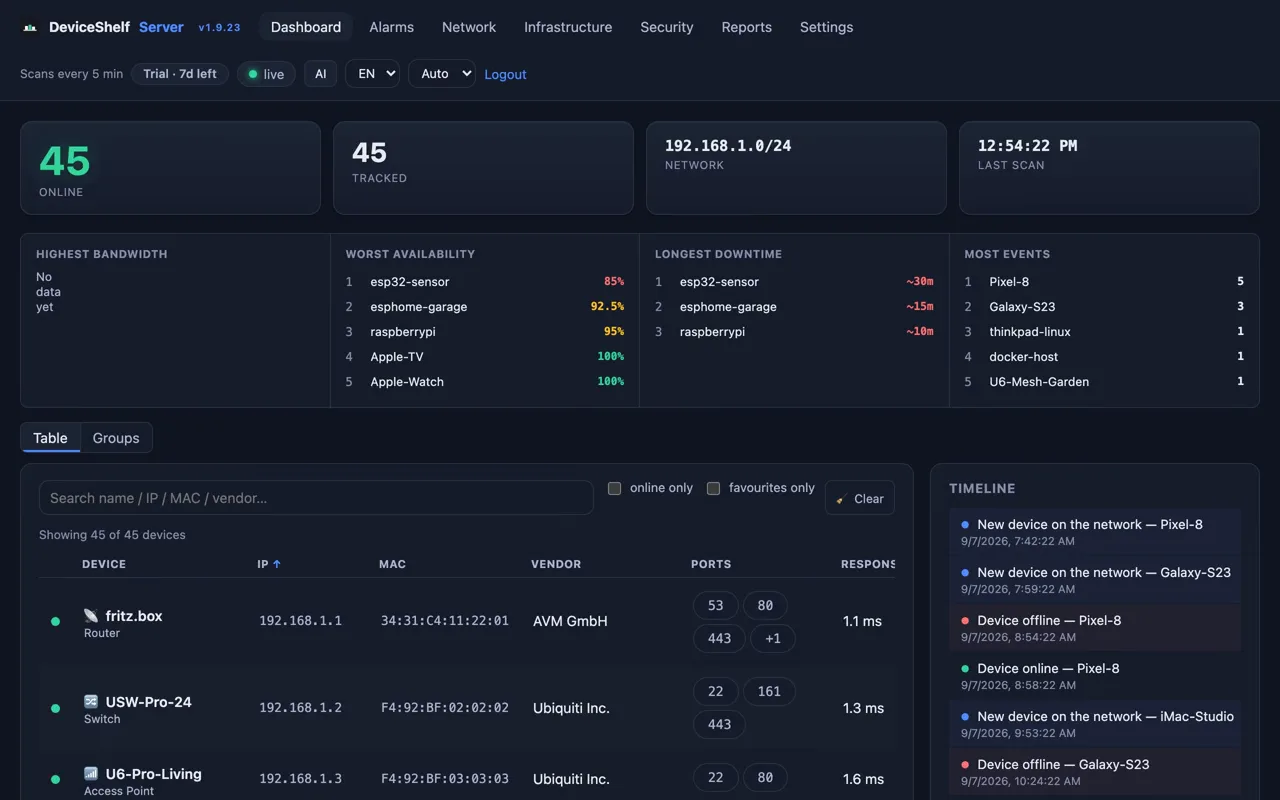
The server dashboard on a fictional network of 45 devices. Open a device, read the timeline, work through the security findings. It resets every hour and keeps nothing you enter.
Open the live demoOne minute through scan, identification, vulnerabilities, bandwidth, monitoring and the server edition, with captions.
Five to seven minutes each, screen by screen: who is on your WiFi, the IP address of every device, alerts for new devices, bandwidth, security, and DeviceShelf on the Mac.
Watch the videosWatch it work
Scan
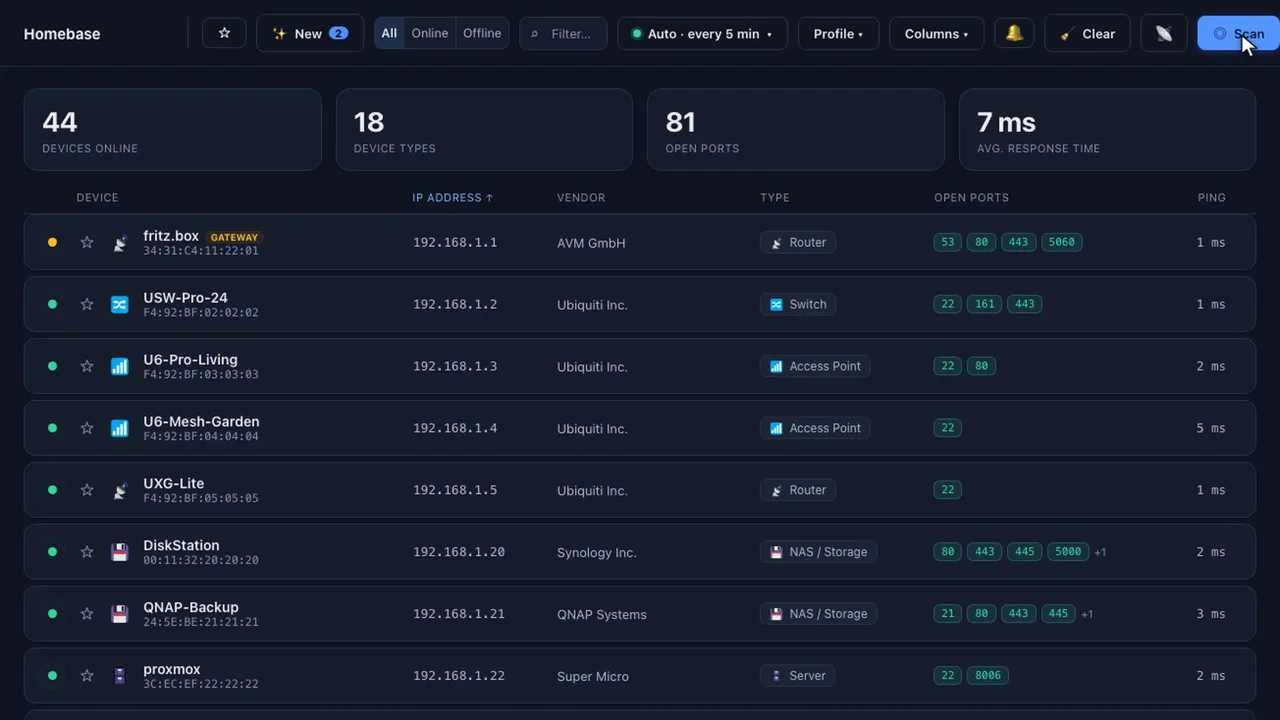
One click on Scan, that's it. Every device that answers shows up with its name, type and open ports right in the row.
Identify
The device drawer pulls its signals together, and your own AI key turns them into a name, a role and the reasoning behind both.
Secure
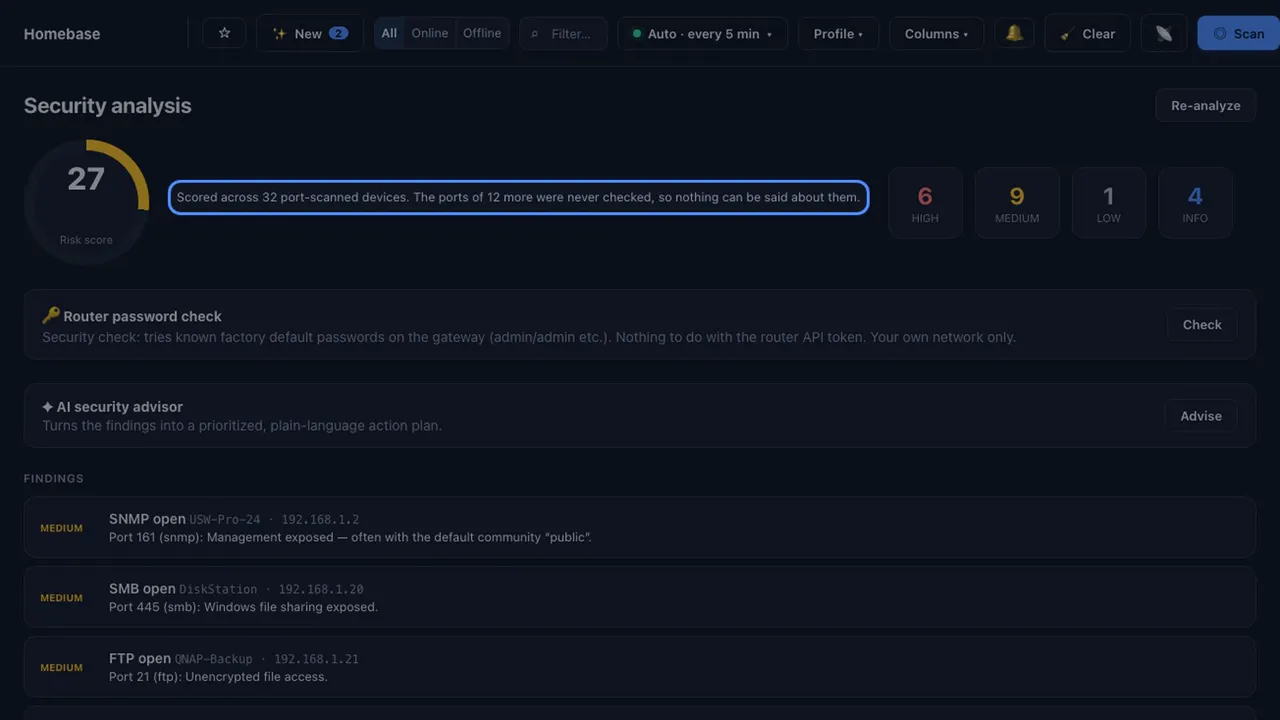
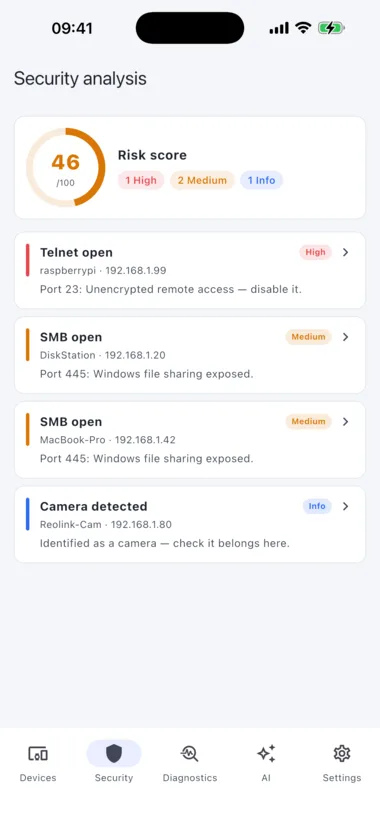
The vulnerability check reads service banners and versions and matches them against known CVEs. Each finding comes with a fix in plain language.
Watch
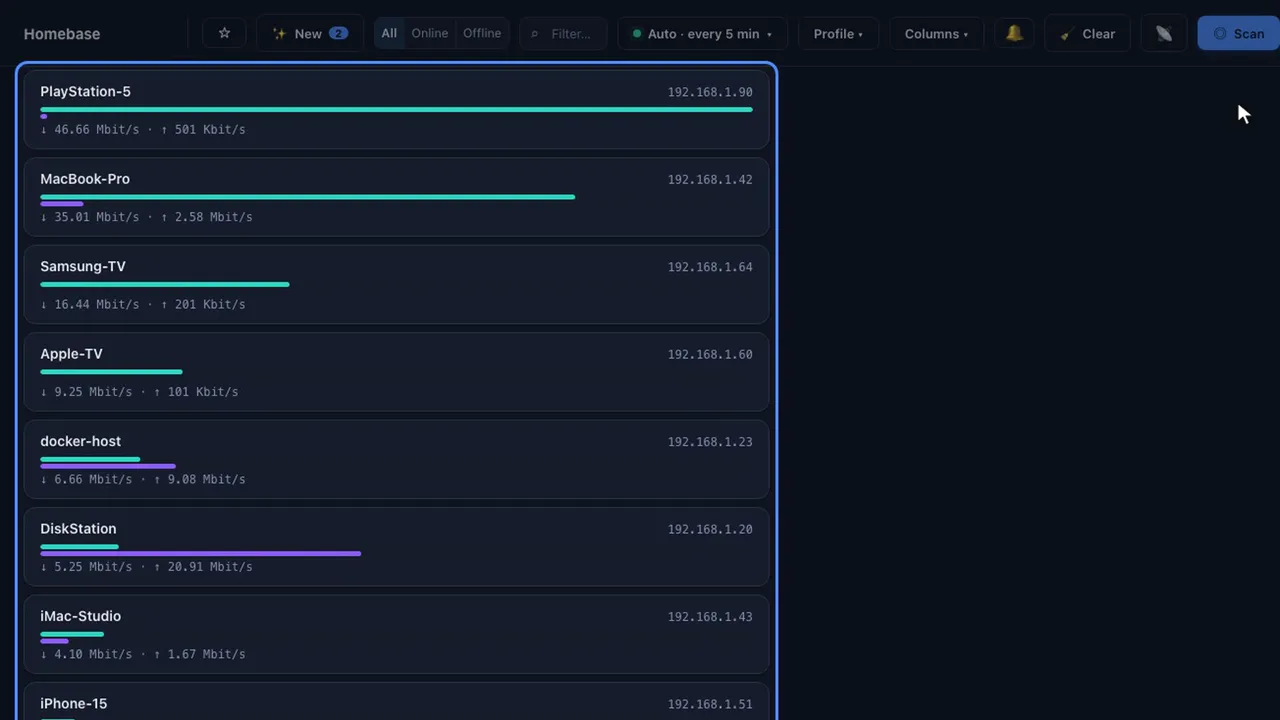
Down in green, up in purple. The bars run live with your network, and you can tell at a glance which device is flooding the line.
History
Open a device and its record is right there: availability over 30 days, the latency curve, and every outage with start, end and duration.
Recorded in the app, on a demo network.
More of the app. Click to enlarge.


Built for AI agents · MCP
The 24/7 server edition speaks the Model Context Protocol. Connect Claude, Cursor, VS Code, Windsurf, Cline or Gemini CLI and ask in plain language: what is on the network, what changed overnight, why the NAS does not answer, which disk fills up first. 37 tools answer from your own scan data, on your own machine.
Included in every license and in the 7-day trial. Off by default, read-only unless you allow actions.
AI, optional
Stuck on a device that's just a MAC address and an open port? Let AI name it from the network signals. Get a plain-language digest of your whole network, ask what's risky and why, and turn the security findings into step-by-step fixes. Everything is grounded in your real scan data, not in a generic checklist.
You bring your own key, and AI is entirely optional. Your prompts never touch our servers; they go directly from your device to the provider you picked. Prefer fully offline? Run a local model with Ollama.
The instruction text of every AI feature is yours to rewrite, and 25 switches decide what goes out about a device. Turn them all off and nothing about a device leaves the machine.
You are not tied to one AI provider. Switch any time in the settings.
Private by default
A scan lists every device in your home or office, which is nothing to hand around. DeviceShelf keeps it on your device. Nothing leaves unless you switch on a cloud feature yourself.
Every scan result is stored locally on your device. There is no DeviceShelf cloud and no central database. Your scan data is not uploaded anywhere.
You can run DeviceShelf without creating a profile. Purchases are tied to the buyer email for licensing, while scan data stays on the device that collected it.
No analytics, no phone-home, no anonymous metrics. The app does not report what you scan, what you find, or that you opened it.
Your license is verified locally with an ed25519 signature. There's no license server, no online activation, no check-in. It keeps working even fully offline.
Data leaves only when you turn a feature on or run an online tool: AI (to your provider), Fingerbank lookup, WAN-IP info, speed test and hop geolocation (Cloudflare & RIPE NCC), or webhooks you configure. Everything is off by default and clearly labeled.
Default scans are non-intrusive TCP-connect probes: they observe, they don't attack. You control depth and timing, from a quick sweep to a full deep scan.
Device recognition
DeviceShelf combines many signals to label each device with a type and a best guess at what it is: MAC vendor (OUI), DNS, mDNS/Bonjour, NetBIOS, SNMP, UPnP, TTL, DHCP fingerprint and open-port profiles.
Desktop and pocket
iOS on the App Store · Android direct download
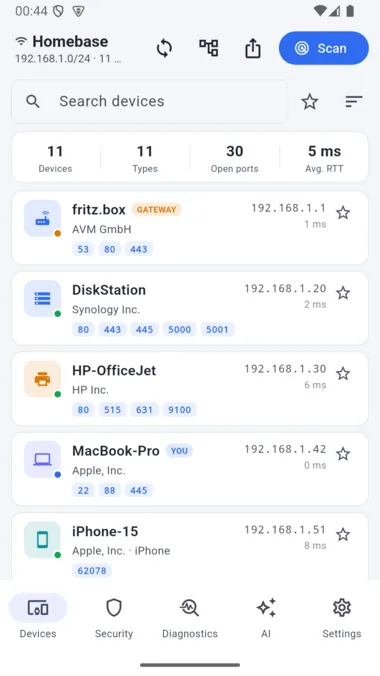
The iOS and Android apps run the same scanning engine as the desktop, not a watered-down companion build. Walk around the house or office and scan from where you stand. One license covers every device you own.
iOS & Android
The mobile apps use the same scanning engine as desktop, so you can inspect a friend's Wi-Fi, an office network or a hotel LAN from the device in your hand.
A direct download, and that's how we ship it. We're not putting DeviceShelf on Google Play: for a local-first tool, the store's review hurdles and Google's grip on Android aren't a trade worth making. It's the same signed app: a 7-day free trial, then activate your license key.
Direct downloads like this one are under threat: starting in September 2026, Google plans to block Android apps from unverified developers. Learn more at keepandroidopen.org
Auto-updates, no store needed. Want the app to update itself? Add DeviceShelf to Obtainium. It watches the direct download and installs new versions for you, with no store account and no tracking. Add to Obtainium
Desktop, pocket, server
A headless server edition runs the same engine continuously in Docker, as a Debian/Ubuntu package, on macOS, or as a Windows service. It keeps watching the networks you care about and alerts you the moment something changes. Covered by your existing license.
The desktop and mobile apps pair with the server and show its devices, history and alarms in their own interface. The server collects around the clock, and you read it in the app.
After start, open the dashboard on your LAN, paste the auto-generated token and configure scans, checks and alerts in the browser. New to the server edition? See the server guide.
Server edition included Run DeviceShelf as a self-hosted, always-on monitor with Docker, .deb or Windows service support.Open the server guidefor installation, tokens, alerts and MCP setup.
Want to look after the servers themselves, with updates, Docker and certificates? That is what ServerShelf ↗ is for.
Features
DeviceShelf starts with a read-only LAN scan, enriches each device with names and signals, then turns the result into monitoring, reports and practical security findings.
Point it at your Wi-Fi or LAN and hit scan. A fast, read-only TCP-connect sweep finds every responding device in seconds and keeps the list fresh on every rescan. It needs no setup, no agents, no router login. It also flags what a plain list hides: two devices on one IP address, a DHCP pool running full, and a fixed address sitting inside that pool.
Multi-homed? Select several adapters (Wi-Fi, Ethernet, VLANs) and DeviceShelf sweeps them all into one merged device list. A “show all adapters” toggle surfaces the interfaces other scanners hide: VPN, VirtualBox, Hyper-V and Docker bridges.
DeviceShelf resolves the vendor (MAC OUI), hostname (DNS, mDNS/Bonjour, NetBIOS), OS (TTL, DHCP fingerprint) and device type automatically: router, computer, phone, printer, camera, NAS, IoT.
A prioritized risk report for the whole network: exposed dangerous services (Telnet, RDP, ADB, Docker API, Redis…), default-credential checks, weak TLS, known-CVE hints and camera/privacy flags, each with a fix and a 0–100 risk score.
Per device, enumerate open TCP/UDP ports with service detection and banner grabbing. Quick, Standard, Deep (1–1024) and Full (1–65535) profiles, plus slow/normal/aggressive timing; you decide between thorough and fast.
Background polling tracks which devices come and go and notifies you when an unknown device shows up on your Wi-Fi. Availability history with uptime and latency per device, perfect for spotting intruders or flaky gear. Alerts reach you by e-mail, push or webhook and respect quiet hours and maintenance windows. The same checks watch your internet uplink, DNS names, TLS certificates and domain registrations, and warn before something runs out.
See live throughput per device so you can tell what's actually using the line right now. Find the streaming box, the backup that's saturating the uplink, or the chatty IoT gadget at a glance.
Go further on any device: TLS grading and certificate inspection, SSH key fingerprinting, SMB share enumeration, UPnP model/serial, SNMP system info and nmap-style HTTP enumeration of common admin paths.
See the real layout, not just a list. DeviceShelf reads LLDP/CDP and the switch bridge table over SNMP to map which device hangs off which switch port, and draws the links between your routers and switches.
Point your routers, switches and access points at DeviceShelf and read their logs in-app: a local syslog receiver (UDP/TCP, RFC 3164/5424). There's no cloud collector; the logs never leave your LAN.
Ping with aggregate stats, streaming traceroute, DNS lookups, a connectivity health check and a built-in speed test (latency, download, upload). Everyday network tools, without opening four other apps.
Power on compatible machines straight from the device list with a single tap. Great for waking a NAS, a desktop or a media server without getting up.
Export the device list to JSON or CSV, or generate a styled, shareable HTML report. Add custom names, notes and type overrides per device; they persist across scans. An optional local API and webhooks let you wire DeviceShelf into your own tooling.
Every device carries its purchase date, warranty end, serial number and location, synced between the desktop app and the server. DeviceShelf warns a chosen number of days before a warranty runs out. Print a sheet of QR labels, stick one on each box, and a scan with the phone app opens exactly that device. The code holds no MAC address, only an opaque id.
The 24/7 server edition speaks the Model Context Protocol: connect Claude, Cursor or any MCP client and ask about your network in plain language: “what changed overnight?”, “why can’t I reach the NAS?”, “which disk fills up first?”. 37 tools, strictly local, read-only unless you allow actions.
Every AI feature's instruction text can be rewritten in Settings, in any language, and one click puts our version back. Under it sits every signal that can go out about a device — 25 of them, each with a switch and the value your device would actually send. Switch them all off and nothing about a device leaves the machine. A preview shows the exact request before it goes.
Scans, notes and reports stay on your device. The license is verified offline with an ed25519 signature, so normal use does not depend on a DeviceShelf cloud account or activation server.
Pricing
One personal license for the buyer email used at checkout: install it on every device that user owns, including desktop, iOS, Android and the server edition. DeviceShelf is a one-time purchase instead of a monthly scanner subscription. Your v1 copy keeps receiving free 1.x updates for as long as the operating systems allow; a future v2 would be an optional paid upgrade. AI runs on your own provider key. The price does not depend on how many devices are on your network. Nine or nine hundred cost the same.
Good to know: DeviceShelf scans the local network the device is connected to. Run it on the Wi-Fi/LAN you want to inspect. Only scan networks you own or are allowed to scan.
€59 once, incl. VAT. v1 is yours to keep, every 1.x update included.
Includes the full v1 package: desktop, the iOS and Android apps, and the 24/7 server edition. AI-ready with your own provider key.
For homelabs, small offices, consultants and privacy-conscious power users.
14-day money-back guarantee. No subscription, ever.
Card, Apple Pay, Google Pay: your license key arrives by email within a minute. SEPA direct debit: DeviceShelf unlocks right away for 7 days, and the permanent key follows once your bank confirms (up to 6 business days).
Download free 7-day trialShelf Bundle: DeviceShelf + ServerShelf, once, incl. VAT. €89 →
Company or MSP missing a specific feature? Business & sponsored features
Honest expectations
Please read this before you buy. It saves both of us a refund.
Everything core works on all three desktop platforms. A few capture and Wi-Fi features depend on the OS:
| Feature | macOS | Windows | Linux |
|---|---|---|---|
| Network scan & device discovery | ✓ | ✓ | ✓ |
| Open ports & security report | ✓ | ✓ | ✓ |
| AI device ID & chat | ✓ | ✓ | ✓ |
| Deep probes (TLS, SSH, SMB, HTTP) | ✓ | ✓ | ✓ |
| Traceroute, ping, DNS, speed test, Wake-on-LAN | ✓ | ✓ | ✓ |
| Snapshots, favorites, tags, export | ✓ | ✓ | ✓ |
| Live bandwidth per device 1 | ✓ | ✓ | ✓ |
| Passive DHCP fingerprinting 1 | ✓ | — | ✓ |
| Nearby Wi-Fi scan (SSID, signal) 2 | ✓ | — | — |
Beyond the desktop, a headless 24/7 server edition runs the same engine on Linux/Windows/Docker: continuous monitoring, no GUI. Server guide →
7-day free trial, no account, no credit card required. macOS is notarized; Windows & Linux are unsigned (you can verify everything on the privacy page).
| x86-64 · amd64 | ARM64 | |
|---|---|---|
| .deb Debian/Ubuntu | Download | Download |
| .rpm Fedora/openSUSE | Download | Download |
| AppImage any distro | Download | Download |
Debian/Ubuntu & ARM: .deb · Fedora/openSUSE: .rpm · any distro: AppImage. Pick arm64 for Raspberry Pi / ARM.
curl -fsSL https://downloads.deviceshelf.app/apt/key.gpg | sudo gpg --yes --dearmor -o /usr/share/keyrings/deviceshelf.gpg
echo "deb [signed-by=/usr/share/keyrings/deviceshelf.gpg] https://downloads.deviceshelf.app/apt stable main" | sudo tee /etc/apt/sources.list.d/deviceshelf.list
sudo apt update && sudo apt install deviceshelfsudo curl -fsSL -o /etc/yum.repos.d/deviceshelf.repo https://downloads.deviceshelf.app/rpm/deviceshelf.repo
sudo dnf install deviceshelfNo GUI: it installs as a background service on Windows Server / Windows 11, Docker, or Debian/Ubuntu/Fedora. Same engine, continuous monitoring, dashboard & API.
Server Edition: downloads & setup →📱 iOS is on the App Store; Android is available as a direct APK download.
New to DeviceShelf? Read the install guide →
Get a short setup series over your first week, then only occasional release news. Confirmed opt-in, unsubscribe in one click. No open or click tracking.
Frequently asked
Find out what it is first. For every IP, DeviceShelf shows the vendor behind the MAC address, the hostname, the device type and the open ports. More often than not the intruder turns out to be a printer, a robot vacuum or a TV. If it stays unclear, the AI names it from its network signals. And if it really does not belong: change the Wi-Fi password, rescan, and leave monitoring on so you catch it immediately next time.
Locally, on the device that ran the scan. There is no DeviceShelf cloud and no account, so your scan data never gets uploaded anywhere. You can export it yourself to JSON, CSV or an HTML report whenever you like.
No scan data leaves your device by default. DeviceShelf only sends scan traffic on your local network; nothing goes to the internet unless you explicitly use an online feature: AI (to the provider whose key you supplied), Fingerbank device lookups (fingerbank.org), WAN-IP info and the built-in speed test (Cloudflare), IP geolocation for WAN info and traceroute hops (stat.ripe.net, RIPE NCC), or webhooks you configure yourself. No analytics, no phone-home, no telemetry.
Scanning a network you own or administer is completely normal, and DeviceShelf's default scans are lightweight, read-only TCP-connect probes: they observe rather than attack. Only scan networks you have permission to scan.
DeviceShelf is built for users who prefer a local-first desktop and mobile scanner without an account, telemetry or subscription. Fing offers its own app ecosystem and subscription plans; DeviceShelf focuses on local network visibility, offline licensing and one-time pricing.
Yes, and AI is entirely optional: the scanner works fully without it. Drop in your Anthropic / OpenAI / Azure OpenAI / OpenRouter / Mistral / Groq / Gemini key, or run Ollama locally for fully offline AI. Your prompts always go directly from your device to your chosen provider.
Yes: the 24/7 server edition (from 1.5.3) includes a local MCP server. Any MCP-capable client (Claude Desktop & Code, Cursor, VS Code, Windsurf, Cline, Gemini CLI) can query your live inventory, alarms, risk score, uptime and infrastructure history, 37 tools in total. If you allow actions it can also run ping, DNS and traceroute, grade a device’s TLS, read its SSH host key and wake a machine, always limited to your own subnet. Strictly local, off by default, and included in every paid license. See the connection guide.
One license = one registered user. The license is personal to the buyer and bound to the email address used at checkout; it may not be shared between multiple people. That user can use the same key on every Mac, PC, Linux box, iPhone and Android device they own.
Yes: a 7-day free trial with full features, no credit card required. After that it's a one-time €59 purchase. No subscription, ever.
Yes. Your purchase is yours to keep; there's no subscription and nothing to renew. v1 keeps improving: every 1.x update brings new features and fixes, free of charge, and we'll keep delivering them for as long as the operating systems allow. No software runs on every future OS forever, but we plan to support v1 for a long time. There's no upgrade treadmill: a future v2 would be a major new generation, years away, and an entirely optional paid upgrade — and you can keep using your v1 either way.
14 days, money-back, no questions asked. Email hello@deviceshelf.app from the address you bought with.
Desktop: macOS, Windows and Linux are available now. Mobile: iOS is on the App Store, and Android is available as a direct APK download. The same scanning engine runs across platforms, and your single license covers desktop, mobile and server edition.
Yes: the headless server edition is part of DeviceShelf. It runs continuous, always-on monitoring without a GUI in Docker, via .deb, or on Windows Server / Windows 11 for networks you want watched around the clock. It is covered by your existing license: same key, no extra cost.
Yes. The desktop and mobile apps can pair with a server edition and show its data instead of, or next to, their own scan. In the desktop app open Remote servers, press Discover (a server on the same network is found automatically) and paste the server's API token. Then pick the server in the source selector above the device list: Server devices only or Server + local devices. Devices, history, alarms, checks, monitoring, health, Docker and topology come across, and alarms can be acknowledged from there. Devices reported by a server are read-only in the app: wake, port scan and connect stay with the local scan, because they would run from your computer rather than from the server. If the server should be the only scanner, switch off Auto-scan in the desktop settings. Details in the server guide.
Yes. For teams, MSPs and privacy-conscious businesses we take on sponsored feature development: custom reports, deployment options, integrations and offline-licensing scenarios. It stays local-first, with no telemetry and no hidden cloud. See the Business & sponsored features page, or email hello@deviceshelf.app.
Weighing your options? Compare DeviceShelf with Fing, LanScan Pro, Advanced IP Scanner & Angry IP Scanner →
Need 24/7 monitoring? Compare DeviceShelf Server with Uptime Kuma, PRTG & Zabbix →
Get started
No credit card, no account, everything stays on your machine. One payment of €59, no subscription.
Talk to us
We read every message and usually reply within a working day. For technical bugs, Help → Send feedback inside the app attaches useful context automatically. For everything else, use the form below.