
Netzwerk-Audit
Geräte auflisten kann jeder Scanner. Dieser sagt dir, was zu tun ist.
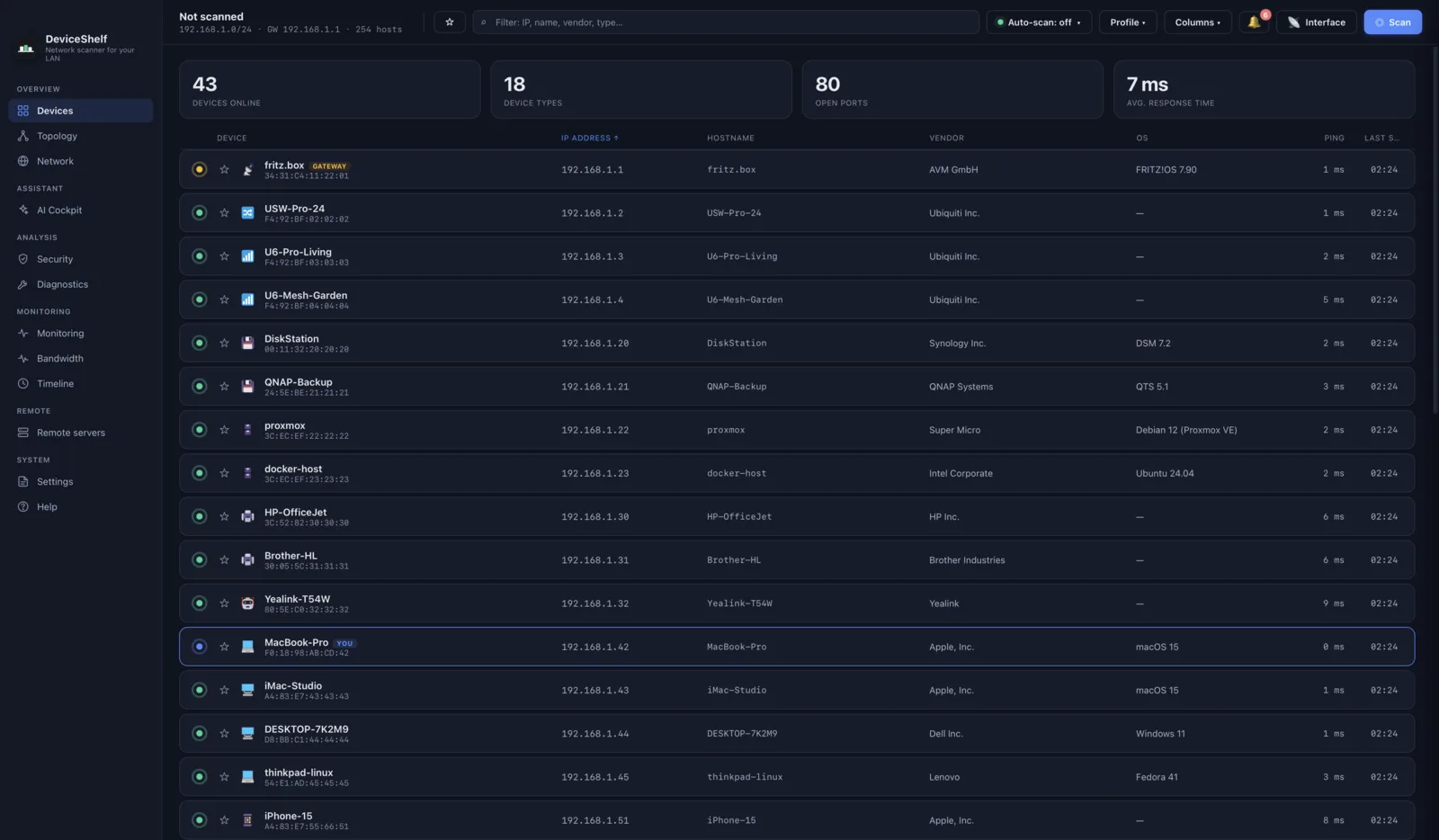
DeviceShelf benennt jedes Gerät in deinem Netz und prüft dann, was eine Geräteliste auslässt: offene Ports, schwaches TLS, freigegebene Shares, Standard-Logins. Es läuft auf deinem Rechner, und dort bleiben auch die Ergebnisse.
59 € einmalig · kein Abo · kein Konto · 14 Tage Geld zurück
Der erste Scan findet meist nichts Beunruhigendes, und das ist ein gutes Ergebnis. Behalten wird die App wegen dem, was danach kommt: dem Sicherheitsbericht und einem Hinweis, sobald etwas Neues dazustößt.
Die Geräteliste ist der Boden, nicht das Produkt
Jedes Werkzeug dieser Kategorie kann dir eine Liste von IP-Adressen zeigen. Dieser Teil ist seit zwanzig Jahren kostenlos, und wenn du mehr nicht brauchst, nimm ein kostenloses — das schreiben wir auch auf unserer Vergleichsseite.
Kostenlose Scanner
Angry IP Scanner fegt schnell durch und hört bewusst bei einer IP- und Portliste auf. Advanced IP Scanner gibt es nur für Windows und ist um RDP und Dateifreigaben herum gebaut.
Fing
Zuerst fürs Handy gedacht und an die Cloud gebunden. Es verlangt ein Konto, Anwesenheitsalarme stecken im Premium-Abo, und die Bandbreite je Gerät braucht ihre Fingbox-Hardware.
DeviceShelf
Identifikation, Sicherheitsbericht, Live-Bandbreite, Alarme und eine 24/7-Server-Edition in einer Lizenz. Desktop und Handy. Kein Konto, keine Telemetrie.
Was der Sicherheitsbericht tatsächlich prüft
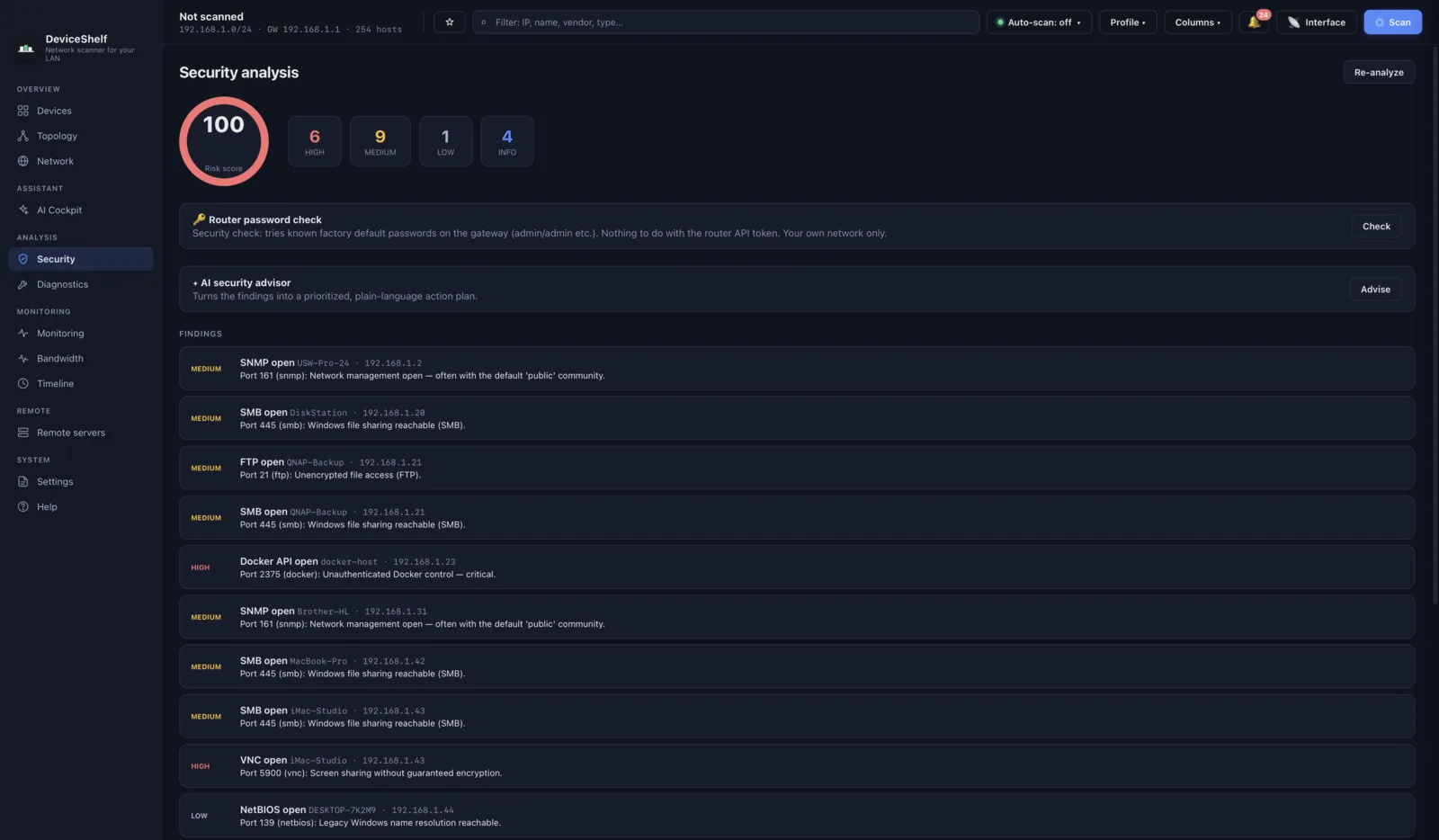
Das ist der Teil, für den du bezahlst. Er läuft gegen die Geräte in deinem eigenen Netz und gibt jedem eine Risikobewertung samt Begründung.
- TLS-Benotung und Zertifikatsprüfung
- Fingerabdrücke von SSH-Schlüsseln
- Offene SMB-Freigaben, einzeln aufgeführt
- Prüfung auf Standard-Zugangsdaten
- Riskante Dienste: Telnet, RDP, ADB, Docker-API, Redis
- CVE-Hinweise aus Daten, die in der App mitgeliefert werden
- UPnP-Modell und Seriennummer, SNMP-Systeminfos
- HTTP-Aufzählung von Admin-Pfaden im Stil von nmap
Du benutzt schon nmap, und das ist kostenlos
Dann kannst du bereits scannen, und beim Scannen schlägt hier nichts nmap. Die 59 € kaufen nicht den Sweep. Sie kaufen, dass du TLS-Benotung, SSH-Fingerabdruck-Vergleiche, Share-Aufzählung und CVE-Zuordnung nicht als private Skriptsammlung pflegen musst — dazu die Teile, die nmap gar nicht macht: Bandbreite je Gerät über die Zeit, eine Topologiekarte aus LLDP und CDP, Anwesenheitsalarme und einen Syslog-Server.
Wenn dir dein Abend mehr wert ist als 59 €, ist das der ganze Handel. Wenn nicht, ist nmap wirklich eine gute Antwort, und uns ist lieber, du benutzt es, als dass du dich verkauft fühlst.
Neu im Lesen von Scan-Ergebnissen? Was ein offener Port wirklich bedeutet erklärt, warum ein Port für sich genommen keine Schwachstelle ist, und die Checkliste für ein sicheres Heimnetz zeigt, welche Korrekturen zuerst lohnen.
Eine Lizenz, jeder Rechner, der dir gehört
Der Kern ist die Desktop-App, auf macOS, Windows und Linux. Die Apps für iOS und Android benutzen dieselbe Scan-Engine, für die Momente, in denen du im Raum stehst statt am Schreibtisch zu sitzen. Die Server-Edition ohne Oberfläche ergänzt durchgehende Überwachung, Alarme und ein Web-Dashboard, unter Docker, per .deb oder als Windows-Dienst. Eine Lizenz für 59 € schaltet sie alle frei, auf jedem Gerät, das dir gehört.
Warum du uns den Datenschutz glauben kannst
Prüf es selbst nach
Mit abgeschalteten Online-Funktionen verbindet sich die App von sich aus nie mit einem DeviceShelf-Server. Häng während eines Scans einen Paketmitschnitt dran, und du siehst ausschließlich LAN-Verkehr. Die Datenschutzseite erklärt genau, worauf du achten musst.
Die Lizenz funktioniert offline
Die Aktivierung ist eine ed25519-Signatur, die auf deinem Rechner geprüft wird. Es gibt keinen Lizenzserver, den man anrufen müsste, also auch nichts, was über dich protokolliert werden könnte.
Rückerstattung ist ein Satz, kein Formular
Schreib innerhalb von 14 Tagen an hello@deviceshelf.app, dass du dein Geld zurück willst. Ohne Begründung, ohne Rückfragen.
Scanne dein eigenes Netz und sieh nach
Sieben Tage, alle Funktionen frei, kein Konto und keine Karte. Findet der Bericht nichts, hast du zwei Minuten verloren und eine Karte deines Netzes gewonnen.
Impressum · Datenschutz · AGB