Angry IP Scanner alternative with device identification
Short answer: if a fast list of addresses is all you need, keep Angry IP Scanner. It is free, open source, runs on Windows, macOS and Linux, and it is actively maintained again: version 3.12.1 came out on 2 November 2026.
People look for an alternative when the list stops being enough: when they want to know what each address actually is, get told when something new joins, or avoid Java. This page covers what Angry IP Scanner does and does not do, and which tools fill which gap, free ones included.
Try DeviceShelf free for 14 days
What Angry IP Scanner does, and what it leaves out
Angry IP Scanner pings every address in a range, one thread per address, which is why it is fast. For each host that answers it can fetch the hostname, the MAC address and its vendor, open ports, NetBIOS details on Windows networks (computer name, workgroup, logged-in user) and whether a web server is running. Results export to CSV, TXT, XML or a plain IP:port list, and Java plugins can add more. It is licensed under the GPL v2 and maintained by Anton Keks.
Version 3.12.1 fixed hosts being wrongly marked as dead, turned on the MAC and vendor columns by default for new users, restored IPv6 ping on Windows and closed a command-injection hole in the Windows terminal openers. After a long quiet stretch between 2023 and 2025, there have been several releases in 2026.
It leaves some things out on purpose. It does not work out what kind of device an address belongs to beyond the vendor and the hostname. It keeps no history between scans, does not watch the network, and does not alert you to anything. And there is no phone app.
Why people look for an alternative
No device types. "192.168.1.47, Espressif" tells you there is a smart plug or a sensor somewhere, not which one. The moment you want names like "living-room TV" or "printer", you need identification from more than one signal.
No monitoring. Angry IP Scanner answers "what is on the network right now". It does not answer "what joined since yesterday", which is usually the question after the first scan.
Java. The Windows installer and the Mac bundles include their own Java runtime, so on those there is nothing extra to install. The standalone Windows executable and all Linux packages need Java 21 or newer installed separately, and the project recommends 25.
Security software. The project's FAQ says some antivirus vendors, McAfee and Symantec among them, have flagged Angry IP Scanner as a potentially unwanted program or a "hacktool" and deleted it, and adds that the cross-platform 3.x line is not detected. On a managed company laptop, a network scanner can still be blocked by policy whatever its name.
Empty MAC column. This one is not down to Angry IP Scanner. A scanner reads MAC addresses through ARP, and ARP does not cross routers, so a sweep only shows them for devices on your own subnet. Switching to another sweep tool will not fix that; only asking the router or switch does.
Angry IP Scanner alternatives, free ones included
Pick by the gap you want to close. We make the last tool on this list, so read that entry with that in mind.
Nmap and Zenmap (free)
If you want more depth on ports and services, Nmap is the reference tool, free on every platform, and Zenmap puts a graphical front end on it. It can guess operating systems and service versions. It gives devices no friendly names and sends no alerts.
Advanced IP Scanner (free, Windows only)
The other classic free sweep. It adds one-click RDP, Radmin and shared-folder shortcuts, Wake-on-LAN and remote shutdown. It is Windows only and has barely changed since 2023. On a Mac it needs a compatibility layer or a virtual machine: Advanced IP Scanner on a Mac.
arp-scan (free, command line)
On Linux, arp-scan finds the devices that answer on the local subnet in seconds via ARP and prints MAC and vendor. It needs root or the CAP_NET_RAW capability and is good for scripts.
Fing (free plan plus subscription)
Strong device recognition from a large shared database and a polished phone app. The desktop app needs an account, the free plan allows three manual scans a day, and monitoring is part of a subscription. Details: DeviceShelf compared with Fing.
LanScan (Mac, free with paid upgrades)
A native Mac scanner from the App Store with IP, MAC, vendor and hostnames from DNS, Bonjour and SMB. It feels more at home on a Mac than a Java app does, but it is Mac only. More: DeviceShelf compared with LanScan.
NetAlertX and WatchYourLAN (free, self-hosted)
If the missing piece is "tell me when something new appears", both run in Docker on a home server, scan on a schedule and send notifications. They take some setup. Our comparison: NetAlertX vs WatchYourLAN.
DeviceShelf (one-time purchase)
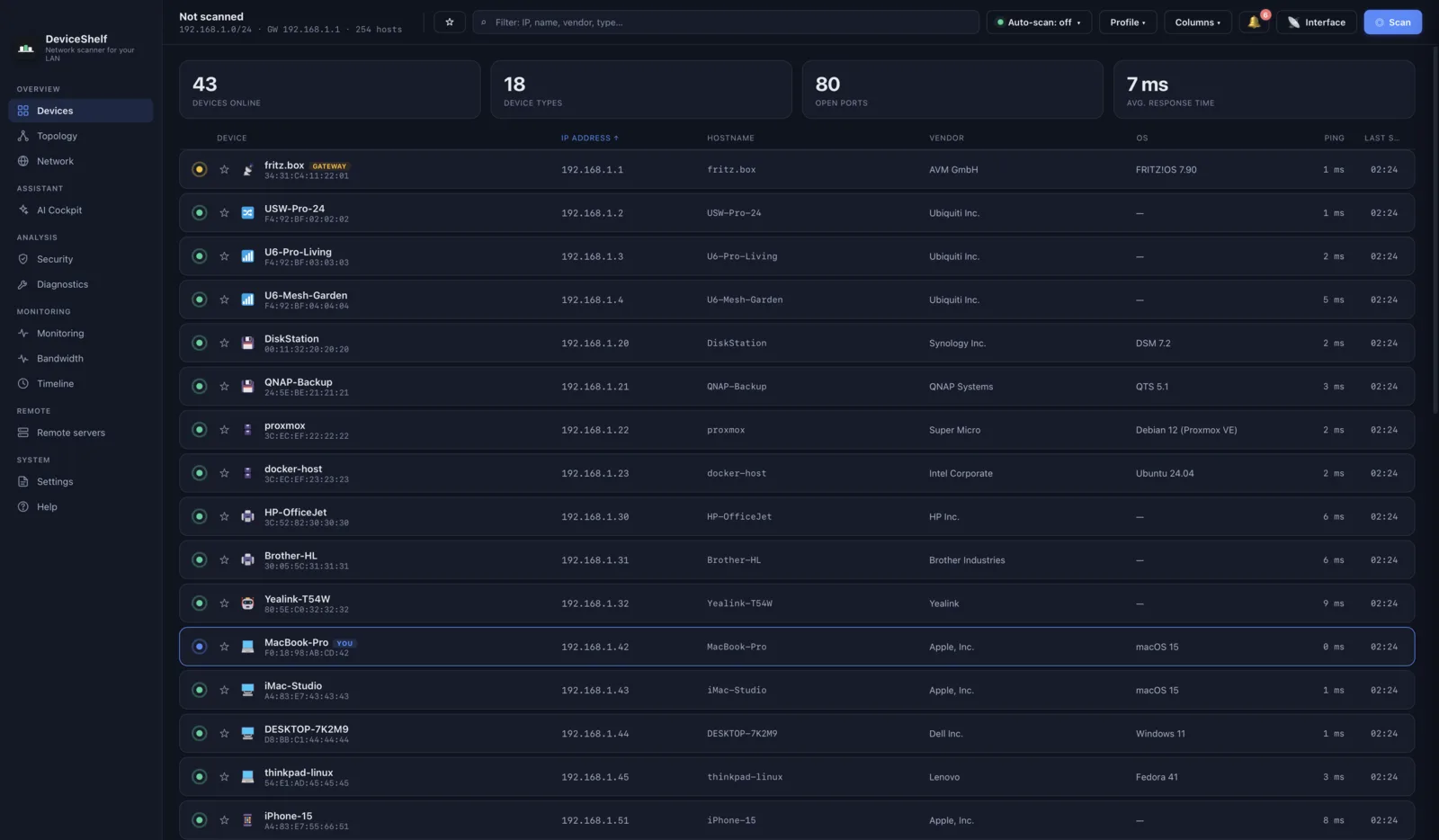
Ours. Like Angry IP Scanner it runs natively on macOS, Windows and Linux, but without Java. The difference is what happens after the sweep. It identifies each device from several signals at once: vendor data, mDNS and Bonjour, SSDP and UPnP, SNMP, HTTP banners, an offline fingerprint set, optionally your router's client list, and optionally an AI model with your own key. It keeps watching, alerts you to new devices, keeps a history and writes a security report on open services. It works without an account, keeps what it finds on your machine unless you switch on the optional AI, and it is not open source.
A portable alternative
Part of what people like about Angry IP Scanner is that it just runs, from a folder or a USB stick. DeviceShelf keeps that where the platform allows it. On Linux it is an AppImage you can start straight from a folder or a USB drive. On macOS it is a self-contained app you drag across and open. Windows uses a small standard installer. There is no account and no sign-up on any of them.
DeviceShelf vs Angry IP Scanner
| Feature | DeviceShelf | Angry IP Scanner |
|---|---|---|
| Desktop: macOS / Windows / Linux | All three | All three |
| Needs Java | No | Bundled on Windows installer and Mac, Java 21+ on Linux |
| Open source | — | ✓ (GPL v2) |
| Pricing | One-time purchase | Free |
| Works without an account | ✓ | ✓ |
| Hostname, MAC and vendor | ✓ | ✓ |
| Device type identification | ✓ (several signals) | — |
| AI device ID & chat (your own key) | ✓ | — |
| Open ports & services | ✓ | ✓ ports, configurable |
| Security report / deep probes (TLS, SSH, SMB, HTTP) | ✓ | — |
| History & new-device alerts | ✓ | — |
| Per-device bandwidth 1 | ✓ | — |
| Physical topology map (LLDP / CDP) 1 | ✓ | — |
| Phone apps (iOS / Android) | ✓ | — |
| 24/7 headless server edition | ✓ | — |
| Export | ✓ | ✓ CSV, TXT, XML |
| Plugins | — | ✓ (Java) |
| REST API / webhooks / MCP server | ✓ | — |
✓ = yes · — = no. Checked November 2026 against angryip.org and the 3.12.1 release notes.
1 Platform- and permission-dependent: live bandwidth uses packet capture (e.g. Npcap on Windows); the topology map needs LLDP/CDP-capable switches.
Keep Angry IP Scanner or switch?
Keep Angry IP Scanner if you want a free, open-source, scriptable sweep. It is good at that, it is maintained, and paying for a replacement would be a waste.
Add Nmap if you need more depth on ports and services. Add NetAlertX or WatchYourLAN if you want free alerts and have a box to run Docker on.
Switch to DeviceShelf if you want to know what each address is, see what joined since yesterday and get told about it, on all three desktop platforms and your phone, without Java and without an account. Run both side by side on your own network and compare what each one shows you. The trial runs for 14 days and needs no card.
Try DeviceShelf free for 14 days See the full comparison
Questions people actually ask
Is Angry IP Scanner still maintained?
Yes. Version 3.12.1 was released on 2 November 2026, after 3.10.0 at the end of August and 3.12.0 in late October. Before that there was a long gap between 3.9.1 in 2023 and 3.9.2 in 2025.
Is Angry IP Scanner safe?
It is open source and the code is public on GitHub. The project says some antivirus vendors have flagged it as a potentially unwanted program or "hacktool" because it is a network scanner, not because it contains malware, and that the 3.x line is not detected.
Does Angry IP Scanner need Java?
The Windows installer and the Mac bundles include Java. The standalone Windows executable and the Linux packages need Java 21 or newer.
Why does Angry IP Scanner show no MAC addresses?
Either the MAC column is switched off (it is on by default for new users since 3.12.1), or the devices are on another subnet. A scan reads MAC addresses through ARP, which does not cross routers, so a sweep cannot see them there.
Can Angry IP Scanner identify device types?
It shows hostname and MAC vendor, which is often enough to guess. It does not classify devices as printers, cameras or TVs. DeviceShelf and Fing do.
Can Angry IP Scanner alert me to new devices?
No. It has no history and no monitoring. NetAlertX, WatchYourLAN, Fing Premium and DeviceShelf can.
Does Angry IP Scanner run on Apple silicon Macs?
Yes, there is a separate build for Apple silicon. It needs macOS 11 or newer; older Macs use version 3.9.3.
What is the best free alternative to Angry IP Scanner?
For depth, Nmap. For a Windows sweep with remote-access shortcuts, Advanced IP Scanner. For alerts, NetAlertX or WatchYourLAN. Nmap can guess a device class such as router or printer from its fingerprints; the others do not identify device types.
More comparisons: Advanced IP Scanner on a Mac · The best network scanner for Mac
All product names, logos and trademarks are the property of their respective owners. Mention here is for identification and comparison purposes only and does not imply any affiliation or endorsement. Feature and licence details are gathered from public sources and may change; if you spot something out of date, please let us know.