Fing alternative without an account or subscription
Short answer: on a computer, Fing needs an account, and the free plan stops after three manual scans a day. Continuous monitoring, notifications and device blocking come with the Premium or Professional subscription, and Fing Agent, the version that runs around the clock on a Raspberry Pi, NAS or Docker host, also requires one of those plans.
If one of those is why you are here, there are good alternatives, and several of them are free. This page goes through what Fing does well, what it costs you in account and cloud terms, and which tools replace which part of it.
Try DeviceShelf free for 14 days
Why people look for a Fing alternative
Fing's own FAQ and pricing page explain most of it.
An account on the desktop. The phone app runs basic scans without signing in, although Fing recommends creating an account. Fing Desktop and the web dashboard require one. Your network data then syncs to that account, which is how Fing keeps phone, desktop and web in step.
Three scans a day on the free plan. The free plan allows up to three manual scans per day. It also includes speed tests and troubleshooting tools, but no automated scans, no notifications and no monitored network.
Monitoring is a subscription. Continuous monitoring, the full event timeline, mobile and email notifications, and blocking or limiting a device's internet access are Premium features. Shared workspaces, the Cloud API and the MCP server for AI agents are in Professional. Both plans are billed monthly or yearly, and there is no one-time option.
Fingbox has disappeared from the line-up. The hardware box many people bought for monitoring is not among Fing's products any more. The pricing page mentions it only in a footnote about which devices can run automated scans. New monitoring setups use Fing Desktop or Fing Agent, and owners of the box are understandably among the people asking for alternatives.
What Fing does well
Fing is the best-known tool in this category for good reasons, and a fair comparison starts there.
Its device recognition draws on a large shared database that users improve as they correct device names. That is hard for a purely local tool to match on unusual hardware. The phone app is polished and is the reason most people know Fing at all. The apps carry no advertising. Premium can block a device or limit its internet time and can block unknown devices automatically, which a pure scanner cannot do. There is outage detection and scheduled speed tests. Professional covers several networks with multiple users. And Fing Desktop comes with a free Local API that lists devices and their status on your own network.
If you want your phone, a desktop and a web dashboard to share one view, and the account does not bother you, Fing is a sound choice and you may not need anything else.
Where your network data goes
This is the part that sends privacy-minded people looking elsewhere, so it is worth stating exactly.
Fing's privacy policy says it collects your public IP address and the MAC addresses of the devices you submit, in order to recognise them, and that you can switch recognition off. The FAQ says your network data syncs to your Fing account, and that the corrections you make to device names help improve Fing's database for all users. Fing also states that it has a SOC 2 Type II report.
None of that is hidden or unusual for a cloud service. It is simply a different model from a scanner that keeps its device list in a file on your own disk. Which one you prefer depends on what you want.
Fing alternatives, free ones included
Fing does several jobs at once, so the right replacement depends on which job you need. We make the last tool on this list, so read that entry with that in mind.
Angry IP Scanner (free)
Free and open source under the GPL v2, on Windows, macOS and Linux. It sweeps an address range quickly, resolves hostnames, reads MAC addresses and vendors on the local network, checks ports and exports to CSV, TXT or XML. It is maintained again: version 3.12.1 came out in November 2026. It does not identify device types and it does not monitor. If you used Fing as a quick "what is on my network" list on a computer, this is the free answer. More: DeviceShelf compared with Angry IP Scanner.
Nmap (free)
The reference tool for ports and service detection, on every desktop platform, free. nmap -sn 192.168.1.0/24 is a good discovery sweep. It is a command-line tool, and it has nothing like Fing's history or alerts.
NetAlertX and WatchYourLAN (free, self-hosted)
If what you miss is the Fingbox-style "tell me when a new device appears", these two run in Docker on a home server or Raspberry Pi, scan on a schedule and send notifications, with no account anywhere. They take some setup and show you a web page rather than an app. We compared them here: NetAlertX vs WatchYourLAN.
LanScan (Mac, free with paid upgrades)
A native Mac App Store scanner that lists every device with IP, MAC, vendor and hostname. The free version shows all devices but hides some hostnames, ports and IPv6 addresses until you buy an upgrade. Mac only, no monitoring. More: DeviceShelf compared with LanScan.
DeviceShelf (one-time purchase)
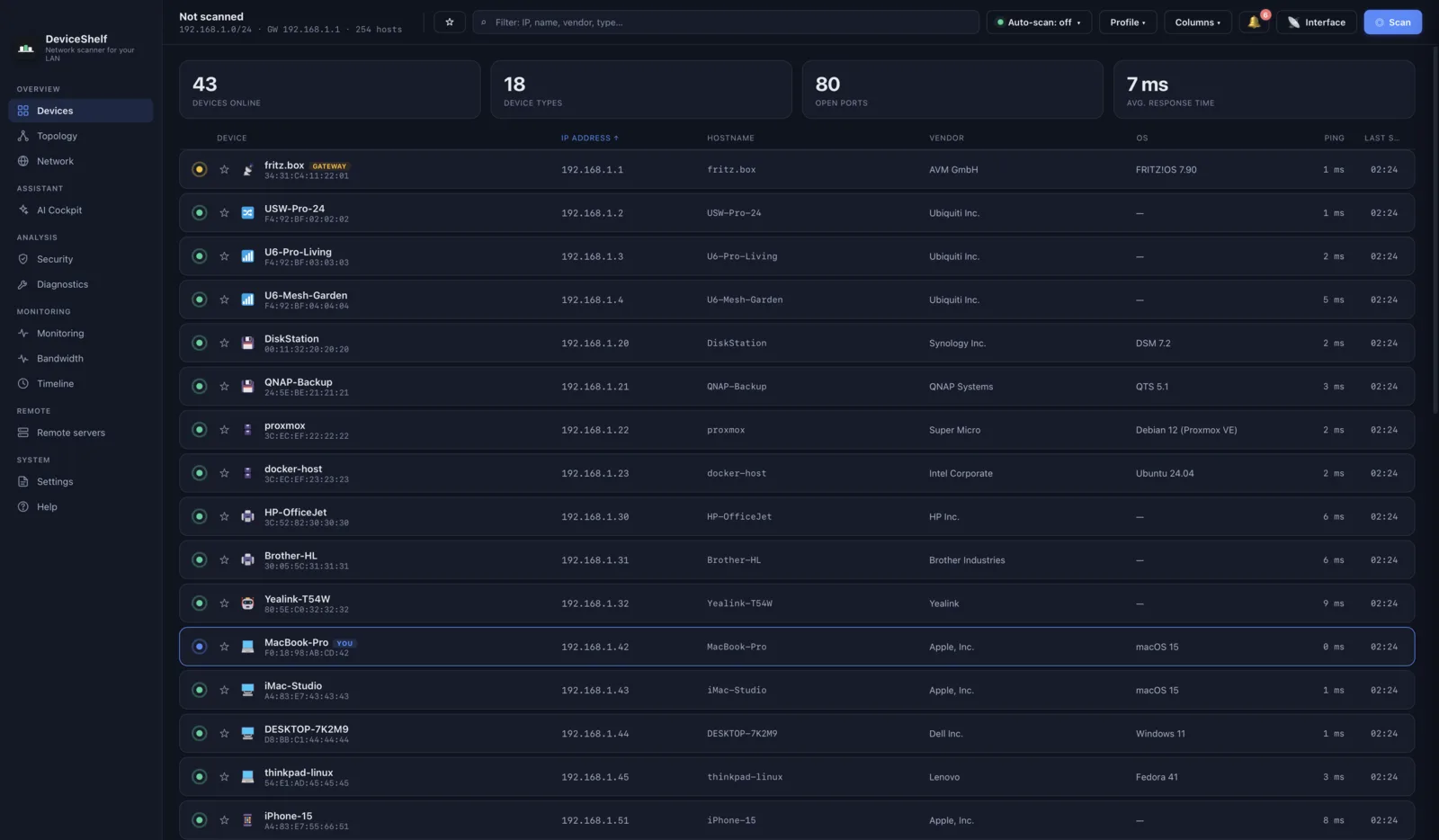
Ours. It covers the parts of Fing that people miss most, without an account. It runs natively on macOS, Windows and Linux, with iOS and Android apps. It identifies devices from several signals at once: vendor data, mDNS and Bonjour, SSDP and UPnP, SNMP, HTTP banners, an offline fingerprint set, optionally your router's client list, and optionally an AI model with your own key. It keeps watching after the scan, alerts you to new devices, writes a security report on open services and keeps a history. One licence covers the desktop app, the phone apps and the 24/7 server edition. Nothing it finds leaves your machine unless you switch on the optional AI. What it does not do is block devices: it shows you what is there, and blocking stays a job for your router.
Fing Agent and Fingbox versus a local server
Round-the-clock monitoring needs something that is always on. With Fing that used to be the Fingbox. For new setups it is Fing Desktop left running, or Fing Agent on a Raspberry Pi, a NAS or in Docker. Fing's FAQ is explicit that Fing Agent requires an active Premium or Professional subscription, and it reports into your Fing account.
DeviceShelf has the same idea without the subscription: a headless server edition that runs as a background service on Windows, in Docker or on Debian, Ubuntu and Fedora, and keeps scanning while your laptop is closed. It comes with the same licence as the desktop app. The phone apps and the desktop can read from it on your own network, and it offers a REST API, webhooks and an MCP server for local AI assistants. See the server edition for details.
If you would rather not pay anyone for this part, NetAlertX and WatchYourLAN above do the always-on job for free in Docker.
DeviceShelf vs Fing
| Feature | DeviceShelf | Fing |
|---|---|---|
| Desktop: macOS / Windows / Linux | All three | macOS and Windows (Linux: Agent) |
| Mobile apps (iOS / Android) | ✓ | ✓ |
| Works without an account | ✓ everywhere | Phone, basic scans only |
| Pricing | One-time purchase | Free plan + monthly or yearly subscription |
| Scans on the free version | Unlimited during the 14-day trial | 3 manual scans a day |
| Device list stays on your machine | ✓ | Synced to your account |
| Shared crowd-sourced recognition database | — | ✓ |
| AI device ID & chat (your own key) | ✓ | — |
| Security report / deep probes (TLS, SSH, SMB, HTTP) | ✓ | ~ open-ports finder |
| Monitoring & new-device alerts | ✓ | Premium |
| Block or limit a device | — | Premium |
| Per-device bandwidth 1 | ✓ | — (not in the current plans) |
| Physical topology map (LLDP / CDP) 1 | ✓ | — |
| Built-in syslog server | ✓ | — |
| 24/7 headless edition | ✓ (same licence) | Fing Agent (subscription) |
| API | ✓ REST + webhooks | Local API free, Cloud API in Professional |
| MCP server for AI assistants | ✓ (server edition) | Professional |
✓ = yes · — = no · ~ = limited. Checked November 2026 against Fing's pricing page and FAQ; features differ by plan and platform.
1 Platform- and permission-dependent: live bandwidth uses packet capture (e.g. Npcap on Windows); the topology map needs LLDP/CDP-capable switches.
Keep Fing or switch?
Keep Fing if you mostly work from your phone, want a large shared recognition database, want to block devices from the same app, or need one view shared across several people and networks. The account and the subscription buy you real things.
Take a free tool if three scans a day was the only problem. Angry IP Scanner on a computer gives you the list with no limit and no account, and NetAlertX or WatchYourLAN give you alerts if you have a box to run them on.
Switch to DeviceShelf if you want identification, monitoring and alerts without an account and without paying every month, on Linux as well as macOS and Windows, with the device list kept on your own disk. The fairest test is to run both on your own network and compare what each one finds. The trial runs for 14 days and needs no card.
Try DeviceShelf free for 14 days See the full comparison
Questions people actually ask
Is there a free Fing alternative?
Yes. Angry IP Scanner is free and open source on Windows, macOS and Linux and gives you a device list with no scan limit. Nmap is free and deeper on ports. NetAlertX and WatchYourLAN are free, self-hosted and send alerts when new devices appear. None of them identifies device types the way Fing does.
Does Fing need an account?
On the phone, basic scans work without one. Fing Desktop and the web dashboard require an account, according to Fing's FAQ.
How many scans does the free version of Fing allow?
Up to three manual scans per day. Automated scans, notifications and monitored networks need Premium or Professional.
Is Fingbox still sold?
Fingbox is not among Fing's current products. The pricing page still lists it as a device that can run monitoring, next to Fing Desktop and Fing Agent; Fing Agent needs a Premium or Professional subscription.
Does Fing run on Linux?
Not as a desktop app. Fing Agent runs on Linux, a Raspberry Pi, a NAS or in Docker, and it requires a subscription. DeviceShelf, Angry IP Scanner and Nmap all have native Linux versions.
Can I use Fing without the cloud?
Not fully. Desktop needs an account, your network data syncs to it, and device recognition sends MAC addresses to Fing. You can switch recognition off, at the cost of the feature Fing is best at.
Why does Fing on my phone not show MAC addresses?
iOS and recent Android versions no longer let apps read the MAC addresses of other devices, and phones also use randomised private addresses. Every phone scanner has this limit, ours included. A desktop app or a server on the same network can still read them.
Can DeviceShelf block devices like Fing Premium?
No. DeviceShelf tells you what is on your network and when something new appears. Blocking a device stays with your router or access point.
More comparisons: Advanced IP Scanner on a Mac · The best network scanner for Mac
All product names, logos and trademarks are the property of their respective owners, including Fing, Fingbox and Fing Agent. Mention here is for identification and comparison purposes only and does not imply any affiliation or endorsement. Feature, licence and plan details are gathered from public sources and may change; if you spot something out of date, please let us know.